HDR Formats Explained: HDR10, Dolby Vision, HDR10+, and HLG
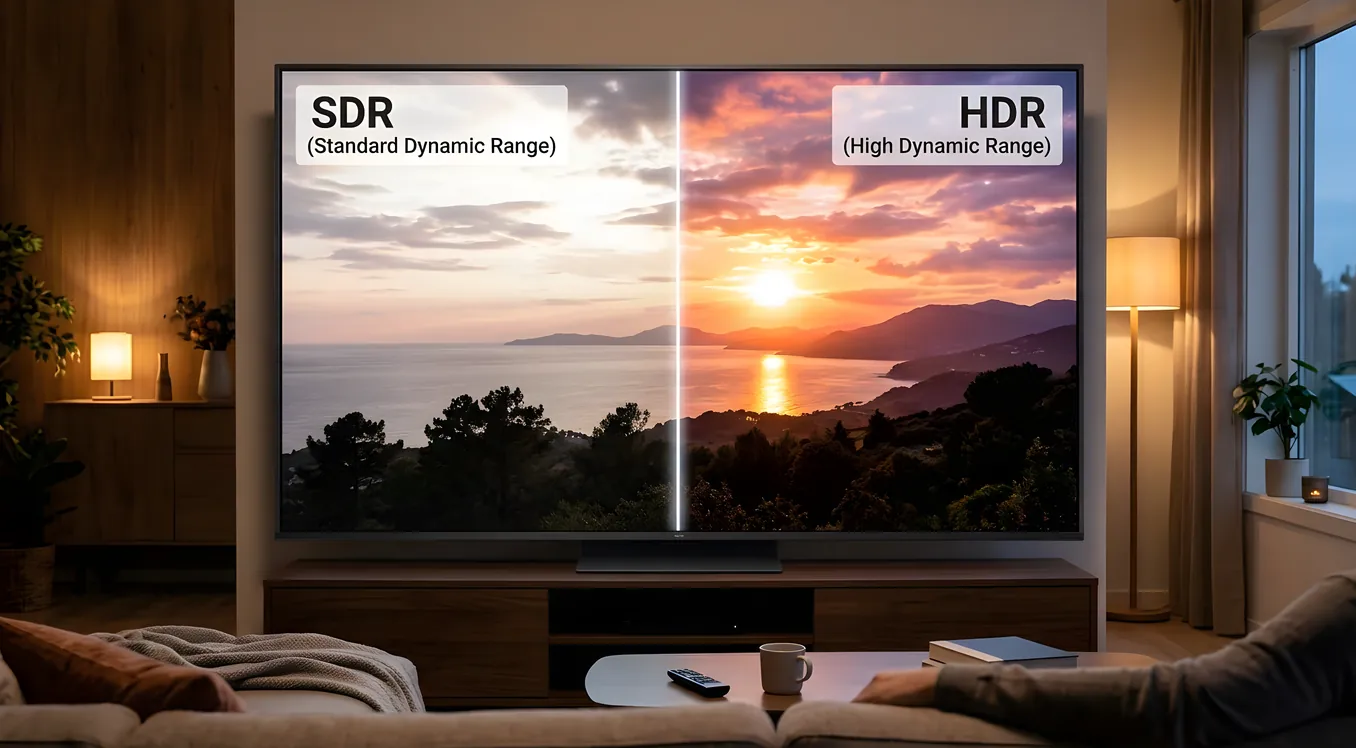
High dynamic range is one of those specifications that travels in impressive company on a TV box without ever explaining what it actually does. Four distinct HDR formats are in active use right now, they are not interchangeable, and your TV or projector supports some combination of them depending on when it was made and what its manufacturer paid for. Understanding how they differ tells you what content you can watch in its intended quality and, more practically, whether chasing a specific format should influence a purchasing decision.
The short version: Dolby Vision delivers the best experience when it is available, HDR10 is the universal baseline that everything supports, HDR10+ improves on HDR10 but has far less content behind it, and HLG is a broadcast standard you will encounter without realizing it. What follows is how each one works, what the technical differences produce in practice, and where each format’s content library actually stands.
SDR vs. HDR: The Fundamental Gap
Standard dynamic range (SDR) has been the baseline for television since the medium existed. SDR content is mastered to a peak brightness of 100 nits and covers the Rec.709 color space, which is the color standard used by HD broadcast and most pre-2015 streaming content. Nits measure luminance, and 100 nits is roughly the brightness of a TV in a dim living room.
HDR content is mastered to peaks of 1,000 to 10,000 nits and covers the wider Rec.2020 color space. In practice, most HDR streaming masters target 1,000 to 4,000 nit peaks, while HDR Blu-ray masters often reach 4,000 nits with some titles mastered as high as 10,000. A television capable of hitting 1,500 or 2,000 nits can reproduce specular highlights (sun glare on water, a lit candle flame in a dark room, reflections off metal) with far more realism than SDR ever could.
Bit depth matters alongside brightness. SDR runs at 8 bits per channel, which yields approximately 16.7 million possible colors. HDR10 specifies 10-bit delivery, which expands the palette to over 1 billion colors. Dolby Vision supports up to 12-bit delivery, adding headroom for even finer gradation in skies and complex gradients. In practice, current display hardware processes most content at 10 bits; 12-bit matters most as mastering headroom for the grading process itself.
The combination of greater luminance range, wider color gamut, and deeper bit depth is what HDR actually means, technically. The four formats are different specifications for how that information travels from source to display, and how the display is told to reproduce it.
HDR10: The Open Baseline
HDR10 is the floor of the HDR ecosystem. Every HDR-capable television, projector, and streaming device supports it. It is a royalty-free, open standard maintained by the Consumer Technology Association, which is a significant reason for its universal adoption.
HDR10 uses static metadata. This means the brightness and color grading information encoded in the stream applies to the entire title as a single set of values. The display reads those values once at the start and applies them throughout. For a film with consistent lighting, static metadata works well. For a film that moves between very dark interiors and very bright exteriors, a single set of values applied to every scene is a compromise: the metadata has to cover the full range without being calibrated to any specific scene.
The technical floor for HDR10 is 10-bit color depth and the Rec.2020 color space, with mastering targets up to 10,000 nits. No current consumer display can hit 10,000 nits. The peak brightness of the mastering reference informs how the display tone maps the content to its own capabilities, which is where static metadata creates its ceiling. If a display cannot reproduce the mastered peak brightness, it has to compress the entire HDR range to fit within what it can do, using those fixed metadata values as the guide.
HDR10 is supported by every streaming service, every 4K Blu-ray disc, every current gaming console, and every HDR-capable television. It is not the best HDR experience available, but it is the one you can always count on.
HDR10+: Dynamic Metadata, Limited Reach
HDR10+ adds dynamic metadata to the HDR10 foundation. Where HDR10 sets a single luminance and color target for an entire title, HDR10+ encodes that information scene-by-scene, or even frame-by-frame. A dark interrogation scene gets different tone-mapping instructions than the bright exterior that follows. The display can render each scene closer to what the colorist intended, rather than applying a single compromise to everything.
Samsung and Amazon developed HDR10+ jointly and released it as an open, royalty-free standard in 2017, which distinguishes it from Dolby Vision’s licensing model. The technology is sound. The scene-level metadata does produce visible improvements over static HDR10, particularly in content with high contrast variation across scenes.
The problem is content. HDR10+ has meaningful support on Amazon Prime Video and on Samsung’s own video platform. Outside of those two sources, the library is thin. Major streaming services including Netflix and Apple TV+ have committed to Dolby Vision rather than HDR10+, and 4K Blu-ray titles with HDR10+ encoding remain a subset of available discs. Samsung TVs support it well; most other manufacturers treat it as a secondary format or ignore it entirely.
If you own a Samsung TV and primarily use Amazon Prime Video, HDR10+ is worth caring about. For most other viewers, it is a specification on a box that rarely influences actual viewing experience.
Dolby Vision: Dynamic Metadata with the Widest Content Support
Dolby Vision is the most technically capable consumer HDR format and the one with the broadest support in premium content. It uses dynamic metadata with scene-by-scene and frame-by-frame optimization, supports up to 12-bit color depth (versus HDR10’s 10-bit), and includes a reference display profile that allows colorists to target specific output devices.
The licensing requirement is what distinguishes Dolby Vision from the other formats here. Manufacturers pay Dolby for hardware certification, and streaming services pay for encoding infrastructure. This has two effects: devices supporting Dolby Vision tend to be mid-range and above rather than budget entry points, and the streaming services that adopted it early built large libraries around it.
Netflix, Disney+, Apple TV+, and Vudu all have substantial Dolby Vision libraries. Apple TV 4K, Roku Ultra, Amazon Fire TV Stick 4K Max, and most current midrange-and-above televisions support it. LG OLED panels in particular are well-regarded for their Dolby Vision performance, in part because Dolby certifies specific TV models and tunes the profile to the display’s actual capabilities. For a detailed look at how OLED panels handle HDR tone mapping at the hardware level, see the OLED vs LED vs Mini-LED breakdown.
Dolby Vision also maintains backward compatibility. Any Dolby Vision-encoded stream contains an HDR10 base layer, so a display that does not support Dolby Vision still gets a functional HDR10 image. You lose the dynamic metadata and the 12-bit color information, but the content plays rather than refusing to display.
Dolby Vision IQ: Ambient Light Compensation
Dolby Vision IQ is an extension of standard Dolby Vision that uses a television’s built-in light sensor to adjust picture settings based on the ambient light in the room. The idea is that a Dolby Vision master looks correct on a calibrated reference monitor in a controlled environment. Your living room at noon with sunlight coming through the windows is not that environment.
With Dolby Vision IQ active, the TV reads ambient light levels continuously and shifts the image brightness and contrast accordingly. Bright rooms get a more aggressive tone-mapping curve that preserves visible shadow detail under high ambient light. Dark rooms allow the display to reduce peak brightness and lean into deeper blacks. The adjustment happens in the Dolby layer, not through a simple brightness slider, so it works within the constraints of the Dolby Vision color volume rather than overriding it.
LG’s implementation was among the first, and Samsung introduced a similar system under the label Intelligent Mode in their QLED and Neo QLED lineup. The feature is meaningful for viewers who watch in variable lighting conditions and do not want to manually adjust picture modes throughout the day.
HLG: Built for Broadcast
Hybrid Log-Gamma (HLG) was developed jointly by the BBC and Japan’s NHK for broadcast use. It solves a problem specific to the broadcast context: how do you send an HDR signal that a standard SDR television can still display acceptably?
HLG encodes the signal in a way that uses a gamma curve (the part SDR displays understand) for the lower half of the brightness range and a logarithmic curve for the higher end where HDR information lives. An SDR television reads the gamma portion and displays a watchable, properly exposed image. An HDR-capable television reads the full signal and displays the extended dynamic range.
This backward compatibility with SDR makes HLG ideal for live broadcast, where a signal has to serve both old and new hardware simultaneously. The BBC has used it for broadcast delivery. Some satellite and cable providers transmit sports content in HLG. YouTube supports HLG for live streaming and some video upload.
HLG does not use metadata, static or dynamic. The display handles tone mapping entirely on its own using the encoded signal. This works for live content where metadata cannot be pre-calculated. For mastered content with a known peak brightness and deliberate grading decisions, the metadata-driven formats (Dolby Vision, HDR10, HDR10+) give colorists more control over the final result.
Most current HDR televisions support HLG. You are unlikely to actively seek HLG content, but you will benefit from it whenever you watch live broadcast sports or events in HDR.
HDR on Projectors: The Brightness Problem
Projectors face a fundamental challenge with HDR that televisions do not. An HDR master targets 1,000 to 4,000 nits of peak brightness. A cinema-grade projector with a laser light source in a commercial setting delivers perhaps 50 to 100 nits on a 150-inch screen. The best consumer laser projectors, running at their maximum rated output in a dark room, might hit 200 to 400 nits on a 120-inch screen under ideal conditions.
The entire premise of HDR, that highlights can be much brighter than the midtones, is difficult to realize on a projector because the absolute brightness ceiling is so low. A TV that hits 1,500 nits can render a sun glare highlight at 15 times the brightness of a 100-nit midtone. A projector at 200 nits can render that highlight at maybe twice the midtone brightness before clipping.
Projectors compensate through tone mapping, compressing the HDR content’s brightness range to fit within what the projector can actually produce. Some manufacturers, including JVC with its Frame Adapt HDR and Sony with its Dynamic HDR Enhancer, implement intelligent tone mapping that analyzes each frame and adjusts the compression curve dynamically. For the 4K projectors that handle this well, the resulting image can look very good, but it is a managed approximation rather than a faithful reproduction of the HDR master.
A practical implication: projectors often look better with content that was originally mastered to lower peak brightness. A film mastered to 1,000 nits maps more gracefully onto a 300-nit projector than a film mastered to 4,000 nits, because the compression ratio is smaller. For recommendations on selecting a projector based on how well it handles this trade-off, see the media players and source equipment guide, which covers how upstream devices can influence the tone mapping pipeline.
Tone Mapping: How Displays Handle Content They Cannot Fully Reproduce
Tone mapping is the process a display uses to translate an HDR signal mastered for one peak brightness into the output its hardware can actually produce. Every display does it. A television rated for 700 nits receiving content mastered to 4,000 nits has to compress the top of the brightness range down to fit its hardware, and the quality of that compression is one of the meaningful differences between display models.
Static tone mapping applies a fixed compression curve to the entire content. The curve is usually calibrated at the factory to handle common mastering targets, but it cannot adapt to scene-level variation. A dark movie gets the same curve as a bright one.
Dynamic tone mapping analyzes the content in real time, frame by frame or scene by scene, and adjusts the compression curve based on what is actually happening. The result is that shadows are handled differently in a dim scene than in a bright outdoor sequence, preserving more visible detail and keeping the image from looking crushed or washed out in extreme cases.
Dolby Vision and HDR10+ both deliver the grading metadata that drives dynamic tone mapping. With Dolby Vision, the tone mapping decisions are embedded by the colorist in the encode; the display implements them as specified. With HDR10+, the metadata provides targets but the display has more latitude in implementation. HDR10 with a good display-side dynamic tone mapping algorithm can approach the results of HDR10+, though it does so without the colorist’s scene-level intent embedded in the stream.
Content Support by Streaming Service
| Service | HDR10 | Dolby Vision | HDR10+ | HLG |
|---|---|---|---|---|
| Netflix | Yes | Yes | No | No |
| Disney+ | Yes | Yes | No | No |
| Apple TV+ | Yes | Yes | No | No |
| Amazon Prime Video | Yes | Yes (limited) | Yes | No |
| Vudu | Yes | Yes | No | No |
| YouTube | Yes | No | No | Yes |
| Max | Yes | Yes | No | No |
| Peacock | Yes | No | No | No |
This reflects the state as of 2026. Netflix’s Dolby Vision library covers nearly all original content and a growing portion of licensed titles. Disney+ launched with Dolby Vision on its originals from the start. Amazon supports both Dolby Vision and HDR10+, with HDR10+ on the larger portion of its library. YouTube’s HLG support covers live streams and some creator uploads.
TV and Projector Format Support
| Display Type | HDR10 | Dolby Vision | HDR10+ | HLG |
|---|---|---|---|---|
| LG OLED (2020+) | Yes | Yes | No | Yes |
| Samsung QLED/Neo QLED (2020+) | Yes | No | Yes | Yes |
| Sony Bravia (most 2020+) | Yes | Yes | Yes | Yes |
| TCL 6-Series (2022+) | Yes | Yes | No | Yes |
| Hisense U8/U9 (2022+) | Yes | Yes | Yes | Yes |
| JVC NZ-series projectors | Yes | No | Yes | Yes |
| Sony VPL-XW5000ES/7000ES | Yes | No | No | Yes |
| Epson LS12000 | Yes | No | No | Yes |
Sony’s BRAVIA XR televisions support all four formats, which is relatively unusual. LG OLEDs lack HDR10+ support, which costs nothing in practice given the thin HDR10+ content library. Samsung’s exclusion of Dolby Vision from its televisions is a deliberate business decision tied to the competing HDR10+ standard Samsung co-developed; if your viewing is concentrated on Samsung and Amazon content, it matters less than it would otherwise. On projectors, Dolby Vision support remains rare because the licensing and hardware requirements are more demanding, and the format’s brightness demands are difficult for projectors to meet regardless.
Which Format Actually Matters
The practical ranking is Dolby Vision, then HDR10, then HDR10+.
Dolby Vision is the premium format with the largest content library at the streaming services most subscribers use. If your television supports it and your streaming service of choice offers it, you are getting the best HDR experience available for that content. The combination of dynamic metadata and wide color support makes a visible difference on a high-quality panel with sufficient peak brightness.
HDR10 is the necessary fallback. Every piece of HDR content ships with HDR10 compatibility. Every HDR display supports it. You are never locked out of HDR because of an HDR10 gap. Its limitation is the static metadata compromise, which matters more on content with dramatic scene-to-scene variation in brightness than on consistently lit films.
HDR10+ sits in a narrow lane: useful if you own a Samsung TV and watch a lot of Amazon Prime Video, meaningless otherwise. The technology is genuine, but the content library has not grown enough to make it a purchasing consideration for general use.
Dolby Vision IQ adds a real-world benefit for variable-light environments. HLG fills a broadcast role you will encounter passively without needing to think about it.
For a television purchase, Dolby Vision support should be a requirement if you are buying mid-range or above. For projectors, focus on the quality of the built-in tone mapping for HDR10, because that is almost certainly what you will be using regardless of what formats the spec sheet lists.