Streaming Devices and Media Players for Home Theater
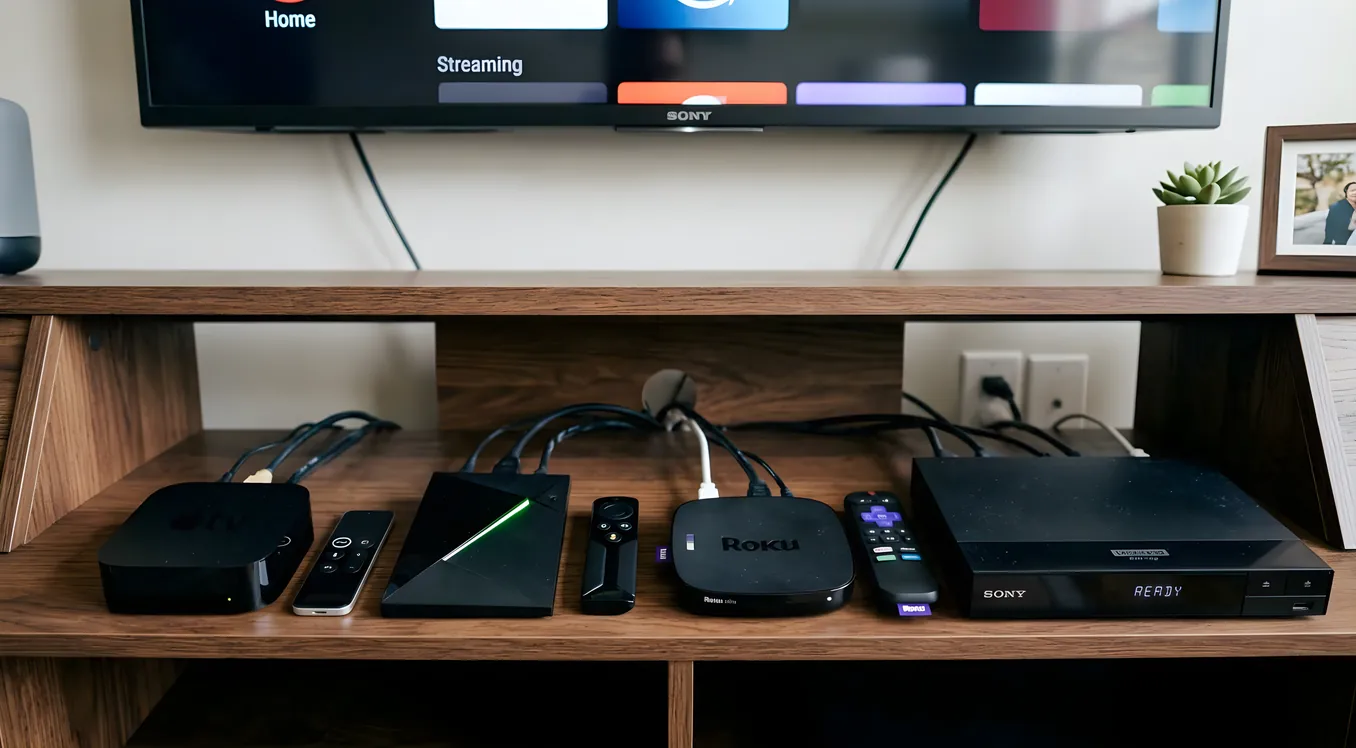
Smart TV apps are a convenience, not a serious source component. Every major television platform ships with a streaming client for Netflix, Disney+, and the rest, and for casual viewing in a living room, that is fine. For a dedicated home theater, the built-in apps are often the weakest link in an otherwise capable signal chain. Processing power is limited, HDR metadata handling is inconsistent, Dolby Atmos passthrough varies by firmware revision, and UI updates arrive on the manufacturer’s schedule, which may be years apart. A dedicated media player addresses all of these problems and keeps the playback layer independent from the display.
The right device depends on what you are playing, how it enters your room, and what control infrastructure manages the system. This guide covers the four main categories: streaming devices, 4K UHD Blu-ray players, media server appliances, and NAS-based solutions.
Why a Dedicated Media Player Outperforms Smart TV Apps
The practical differences between a smart TV app and a dedicated streaming device are larger than they appear on a spec sheet.
Processing headroom is the first issue. Streaming devices have dedicated processors built for one job: decode, process, and output video and audio. Smart TV chipsets divide compute resources across the OS, ambient mode, app updates, voice assistants, and the display panel itself. When a Dolby Vision profile 5 (IPT-PQ) stream requires real-time tone mapping, a dedicated processor handles it without dropped frames. Many smart TV implementations fall back to HDR10 or exhibit stuttering under the same load.
Audio passthrough is the second, and for most home theater setups, the more consequential issue. Dolby Atmos over eARC and TrueHD bitstream passthrough require the source device to hand off the undecoded audio signal to an AV receiver or pre/pro for decoding. Many smart TV apps decode Atmos internally and then output a downmixed PCM signal rather than passing the full TrueHD stream. A dedicated player with proper bitstream output lets your receiver or processor do the work it was designed to do, preserving the full object-based audio mix.
UI consistency matters more in a dedicated room than it does in a living room. Smart TV platforms receive fewer updates per year than standalone streaming boxes, and major platform redesigns occasionally break third-party apps or shift the interface enough to require relearning. Streaming devices update their software more frequently, and the leading platforms (Apple, Google, Roku) maintain backward compatibility more reliably across app ecosystems.
Dolby Vision layer handling varies significantly by implementation. Dolby Vision carries a base layer (HDR10-compatible) and an enhancement layer with the full dynamic metadata. The enhancement layer data is what makes Dolby Vision look better than standard HDR10, and not every playback device uses it correctly. Dedicated streaming devices from Apple and Nvidia process both layers with hardware acceleration. Some smart TV implementations strip or approximate the enhancement layer, producing output that is labeled Dolby Vision but does not match the reference intent.
Streaming Devices
The streaming device market has four devices that matter for a home theater context. Budget options exist, but below this tier, audio passthrough support and processing power become limiting factors.
Apple TV 4K (3rd generation) is the default recommendation for most home theater streaming setups. It outputs Dolby Vision, HDR10, and HDR10+. Audio handling includes Dolby Atmos passthrough via both HDMI ARC/eARC and Dolby Digital Plus with Atmos metadata over optical. The A15 Bionic chip is substantially faster than competing streaming chipsets, which shows in UI responsiveness and in the quality of upscaling applied to sub-4K content. Thread-Safe Multi-App audio is supported, meaning Atmos-enabled apps maintain the Atmos signal path without the user needing to adjust audio settings per-app. Price is approximately $130.
The limitation is ecosystem: Apple TV 4K is an Apple platform. AirPlay 2 integration and HomeKit compatibility are genuine advantages if you use Apple hardware, but if your control system is Android- or Google-centric, those integrations are less useful.
NVIDIA Shield TV Pro targets users who want Android TV with maximum performance. The Tegra X1+ processor is powerful enough to run Plex Media Server locally on the device, which means the Shield can simultaneously serve as a Plex client and a Plex server for a moderate library. This dual function is unique among streaming devices. The Shield also supports Dolby Vision (added via software update), HDR10, and HDR10+, with full Dolby Atmos passthrough. The AI upscaling feature (SHIELD AI Upscaling) uses a trained neural network to upscale 1080p content to 4K, and the results are visibly better than bicubic scaling on lower-powered devices. Price is approximately $200.
Android TV has more maintenance overhead than tvOS or Roku OS. App sideloading is possible, which is useful for Plex, Kodi, or regional streaming services. The Shield TV Pro is the right device if your source library includes local files, if you run Plex, or if Android TV’s flexibility matters more to you than Apple’s tighter ecosystem.
Amazon Fire TV Cube (3rd generation) occupies a different position. Its processing power is competitive, and it supports Dolby Vision and Dolby Atmos passthrough. The primary differentiator is Alexa voice control, which for Amazon-centric smart home setups is genuinely useful: you can control compatible AV receivers via Alexa, adjust HDMI inputs, and manage Fire TV Cube playback with voice commands without a remote. The Ethernet port and USB port are useful for stable network connections and local media playback. Price is approximately $140.
The Fire TV Cube’s weakness is the Amazon ecosystem emphasis. The app selection is comprehensive, but non-Amazon streaming services receive less favorable UI placement, and the Alexa integration is most valuable if you already use Amazon smart home devices.
Roku Ultra is the most app-compatible platform available. Roku maintains one of the largest streaming app libraries, and its interface is the most straightforward to use. The Roku Ultra adds Ethernet, a headphone jack on the remote, and private listening. Dolby Vision and Dolby Atmos passthrough are supported. The platform receives frequent updates and has the widest app availability of any streaming platform, including services that skip other major platforms. Price is approximately $100.
Roku’s limitation is processing power: the platform is designed for streaming, not for local media playback or AI upscaling. If your source is exclusively subscription streaming services and you want the widest possible app compatibility, Roku Ultra is a strong choice. If you need local media playback, the Shield TV Pro is the better answer.
4K UHD Blu-ray Players
Physical media remains the highest-quality delivery mechanism for home theater content, and the margin is not small. A 4K UHD Blu-ray disc carries a video bitrate of up to 100 Mbps with lossless audio. The best 4K streaming services deliver approximately 25 Mbps with lossy audio compression. For reference-quality playback of content that matters to you, disc is still the right answer.
HDR formats on physical media are also more reliable than their streaming equivalents. A 4K Blu-ray disc encoded with Dolby Vision carries the full enhancement layer data without the transcoding compression that streaming platforms apply.
Panasonic DP-UB820 is the standard recommendation in the sub-$400 4K Blu-ray player category. It supports Dolby Vision, HDR10, HDR10+, and HLG output, and its video processing chain handles HDR-to-SDR conversion competently when feeding displays that do not support HDR. The UB820 includes two HDMI outputs, which allows separate video and audio routing: video to the display over one HDMI connection, audio to the receiver over the second. Panasonic’s Chroma processing (HCX Pro Multimedia Processor on the UB820) handles upscaling and color reconstruction from compressed disc data. Price is approximately $350.
Panasonic DP-UB9000 steps up with a fully balanced analog audio output stage, which matters if you connect to a high-quality two-channel system rather than routing through a receiver. The UB9000 also adds Panasonic’s Filmmaker Mode, which disables motion processing to preserve director-intended cadence and frame rate. For listeners who value the two-channel audio path as much as the video path, the UB9000 is worth the premium over the UB820. Price is approximately $800.
Sony UBP-X800M2 competes directly with the Panasonic UB820 on specifications and performs similarly on video quality. Sony’s implementation of Super Bit Mapping for 4K (SBM4K) handles color depth and dithering competently. The X800M2 includes Bluetooth audio output, which the Panasonics lack, useful for headphone listening without a wired connection. Build quality is comparable, and sound output through the analog stage is slightly warmer than Panasonic’s more neutral presentation. Price is approximately $300.
Magnetar UDP900 is the reference-class option for serious disc playback. It is an audiophile-grade universal disc player that handles 4K UHD Blu-ray, standard Blu-ray, DVD, and SACD/DVD-Audio. The UDP900 uses a custom ESS Sabre ES9068AS DAC and a fully discrete analog output stage, which outputs at a level of quality that is audible on a high-resolution audio system. Video processing is competitive with the Panasonic UB9000. The UDP900 is for builds where disc playback is the primary use case and the audio system is resolving enough to reveal the difference. Price is approximately $1,500 to $1,800.
Media Server Appliances
Media server appliances store and serve content from a local library with interface quality that matches or exceeds commercial streaming services. The audience for this category is narrower: collectors with large physical media libraries who rip discs to a server, or buyers who want bit-perfect access to purchased content without the compression of streaming delivery.
Kaleidescape is the reference system for the category. It combines a disc player (the Strato) with a server (the Terra) that stores full-bitrate disc rips at up to 100 Mbps, including all bonus features, lossless audio tracks, and Dolby Vision metadata. The interface is commercial-grade: movie artwork, trailers, bonus material, and instant resume are all handled with attention to the viewing experience. Kaleidescape content is licensed, not pirated: the system includes DRM, and it operates a movie store that sells permanent download licenses for 4K HDR content at full disc bitrate. A Strato player runs approximately $4,000; the Terra server adds $1,500 to $5,000 depending on storage capacity.
Kaleidescape’s appeal is the combination of disc-quality video, instant chapter access, and a genuinely pleasant UI in a single product. Its limitation is cost and closed ecosystem: content purchased through the Kaleidescape store is tied to the platform.
Zappiti offers a more open alternative. The Zappiti Player 4K HDR is a networked media player that supports Dolby Vision, HDR10, HDR10+, and lossless audio passthrough. It connects to a NAS or internal storage and presents content through an interface that handles movie artwork, metadata, and collection management. Unlike Kaleidescape, Zappiti plays content from any source: disc rips you create with your own tools, downloads, and library files from network storage. Price for the player is approximately $500 to $900 depending on configuration.
Dune HD devices occupy similar territory: network media players with broad format support, including MKV containers, ISO disc images, and high-bitrate files that would overwhelm a streaming device’s processor. Dune HD’s interface is less polished than Zappiti’s but its format compatibility is comprehensive. For playback of existing ripped libraries in varied formats, Dune HD is a practical choice.
NAS-Based Plex and Jellyfin
For ripped disc libraries that need to be accessible across multiple rooms and devices, a NAS (Network Attached Storage) running Plex or Jellyfin is the most flexible approach.
Plex and Jellyfin both function as media servers: they organize your library, fetch artwork and metadata, and transcode or direct-stream content to clients on your network. The distinction between the two is licensing: Plex is a commercial product with a free tier and a paid Plex Pass subscription ($40/year or $120 lifetime) that unlocks hardware transcoding and offline sync. Jellyfin is open-source with no licensing costs.
Hardware requirements depend on what the server will be asked to do. If clients on your network can direct-play the source files (meaning the client device supports the container, codec, and audio format natively), the NAS only needs to read files and send them over the network. A NAS with a modest processor (Intel Celeron N5105 or equivalent) handles direct play well. If the server needs to transcode (converting files that clients cannot play natively), CPU and optional GPU matter more. Transcoding a single 4K HDR HEVC stream in software requires approximately 12 to 16 CPU threads of modern processor capacity. Hardware transcoding via Intel Quick Sync (available on NAS devices with supported Intel processors) handles 4K transcoding on a Celeron-class CPU, which is why a NAS with Quick Sync support is recommended for Plex libraries above 500 titles or for multi-room setups where simultaneous transcoding is likely.
Network requirements for a NAS-based Plex setup are straightforward but non-trivial. A 4K HDR disc rip at 60 to 80 Mbps requires approximately 10 MB/s sustained network throughput. A wired Gigabit Ethernet connection between the NAS and the router, and between the router and the playback device, handles this comfortably. Wi-Fi (2.4GHz) will not. Wi-Fi 5 or Wi-Fi 6 on the 5GHz band is acceptable if wired connections are not possible, but interference and distance attenuation remain factors.
Jellyfin for disc-quality rip playback on a wired home theater setup is a legitimate alternative to Plex. The server handles MKV, M2TS, and ISO files, passes through lossless audio formats including Dolby TrueHD and DTS-HD MA, and delivers them to clients over the local network. The client interface requires more configuration than Plex but costs nothing and has no server-side licensing restrictions.
Feature Comparison
| Device | Dolby Vision | Atmos Passthrough | 4K HDR | Format Support | Price (approx.) |
|---|---|---|---|---|---|
| Apple TV 4K (3rd gen) | Yes | Yes (eARC + DD+ Atmos) | Yes | Streaming only | $130 |
| NVIDIA Shield TV Pro | Yes | Yes (bitstream) | Yes | Streaming + local files | $200 |
| Amazon Fire TV Cube | Yes | Yes (bitstream) | Yes | Streaming + limited local | $140 |
| Roku Ultra | Yes | Yes (passthrough) | Yes | Streaming only | $100 |
| Panasonic DP-UB820 | Yes | Yes (TrueHD bitstream) | Yes | Disc only | $350 |
| Panasonic DP-UB9000 | Yes | Yes (TrueHD bitstream) | Yes | Disc only | $800 |
| Sony UBP-X800M2 | Yes | Yes (TrueHD bitstream) | Yes | Disc only | $300 |
| Magnetar UDP900 | Yes | Yes (TrueHD bitstream) | Yes | Disc + SACD/DVD-A | $1,600 |
| Kaleidescape Strato | Yes | Yes (lossless) | Yes | Kaleidescape store + disc | $4,000 |
| Zappiti 4K HDR | Yes | Yes (bitstream) | Yes | Local files + network | $700 |
HDMI Handshake Issues and CEC Reliability
HDMI handshaking is the protocol negotiation that occurs every time a device powers on or an input switches. The handshake determines HDCP version, supported HDR formats, audio capabilities, and refresh rate. When it fails, you get a black screen, a display that flashes HDR then drops to SDR, or audio that cuts out. This is one of the most common and frustrating problems in home theater setups.
The reliability difference between devices is real. The HDMI 2.1 specification tightened handshake requirements, but implementations vary. Apple TV 4K has historically had fewer handshake issues than competing streaming devices, partly because Apple controls both hardware and software and can test exhaustively against a defined device matrix. The NVIDIA Shield has had known handshake issues with specific Denon and Marantz receivers that required firmware patches from both sides.
CEC (Consumer Electronics Control) is the HDMI feature that allows devices to control each other: turning on the display and receiver when the player powers on, adjusting volume through the TV remote. In theory, CEC enables single-remote operation of a full home theater stack. In practice, CEC implementation quality varies so much across manufacturers that many installers disable it and replace the function with dedicated control systems.
The best CEC implementations in the streaming device space are Apple TV 4K (Apple calls it HDMI-CEC and it works consistently) and Roku (also reliable). Amazon Fire TV Cube’s CEC is competent when Alexa integration is part of the stack. NVIDIA Shield TV Pro’s CEC has had intermittent reliability issues that Google has addressed in Android TV updates with varying success.
For a system with a control processor, CEC is typically bypassed entirely in favor of IP or IR control.
Integration with Control Systems
Professional home theater installations managed by Control4, Savant, Crestron, or similar control processors use IP and IR control rather than CEC. Each device in the stack has a defined communication protocol that the control processor uses to send commands, receive status, and confirm state.
Apple TV 4K does not have a native two-way IP control driver in the Control4 or Crestron driver ecosystems. Control is typically implemented via IR, using a global cache or similar IR-over-IP device. One-way control (sending commands to the Apple TV) works reliably; feedback (knowing whether the Apple TV is on and what app is running) requires workarounds via the AV receiver’s HDMI control loop.
NVIDIA Shield TV Pro has a more complete driver availability for Android TV in the commercial control ecosystem. Control4 and Crestron have published Android TV IP control drivers that communicate directly with the Shield via the Android debug bridge. Two-way feedback is available, which allows the control processor to know the Shield’s playback state and current app.
4K Blu-ray players from Panasonic and Sony both support IP control via their network interfaces. Panasonic’s MyRemote protocol and Sony’s IRCC-IP protocol are documented, and driver availability for Control4 and Crestron is widespread. Two-way status feedback is available on both platforms, which means a control system can confirm disc load status, playback position, and transport state.
Kaleidescape has the most complete control system integration in this category. The Kaleidescape API is open and well-documented, and native drivers exist for Control4, Savant, and Crestron. The system exposes metadata, cover art, chapter information, and playback status to the control processor, enabling rich UI overlays that show what is playing on a touch panel.
For integrators building managed home theater systems, source device selection should weight control system compatibility alongside playback capability. A device that sounds or looks slightly better but has no control system driver creates integration overhead that outweighs the performance advantage.
Choosing the Right Source Configuration
Most home theaters benefit from two source devices: a streaming box and a 4K Blu-ray player. The streaming box handles subscription services with a polished, regularly updated interface. The Blu-ray player handles disc playback at lossless bitrates for content you care about enough to own physically.
For streaming, the Apple TV 4K is the default unless Plex server functionality, local file playback, or Android ecosystem integration drives you toward the NVIDIA Shield TV Pro. Roku Ultra is the value choice if streaming service breadth matters more than upscaling quality or local media support.
For disc playback, the Panasonic DP-UB820 covers most use cases below $400. Step up to the UB9000 if you run a two-channel analog system that benefits from the balanced output stage. The Magnetar UDP900 is for builds where the audio chain is resolving enough to reveal the difference.
For local library playback at scale, the NVIDIA Shield TV Pro with a network-attached NAS is the most practical combination for most users. Kaleidescape is the right answer for buyers who want a fully integrated, licensed, and consistently reliable disc-quality library without managing ripping workflows and storage themselves.
The source layer is worth spending time on. A reference display or a carefully calibrated projector will show you every limitation of a weak source device, and the best displays in the market are significantly more revealing than the streaming boxes and disc players most people connect to them.