Multi-Zone Audio Explained: Independent Music in Every Room
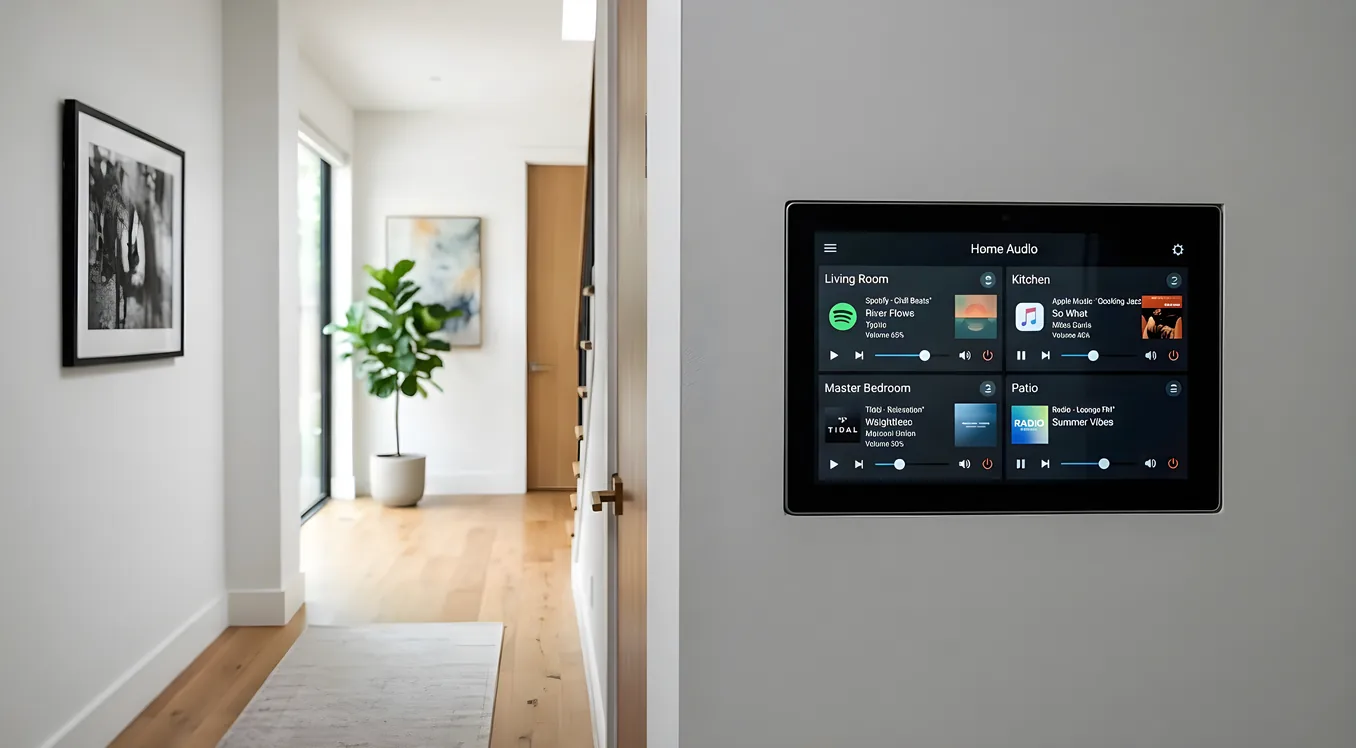
A multi zone audio system does one thing a single-zone system cannot: it lets different rooms play different music at the same time. The kitchen can stream a podcast while the patio plays jazz and the master bedroom stays quiet. Each space operates independently, on its own schedule and at its own volume. That independence is what separates a true multi-zone system from whole-house audio where every speaker plays the same thing.
Zone vs. Group: Two Different Concepts
A zone is a room or area with its own independent audio path. It has its own volume control, its own source selection, and it can play something completely different from every other zone in the house.
A group is a collection of zones playing the same source in sync. If you want the same playlist running through the kitchen, dining room, and living room simultaneously, you group them. Groups are a feature layered on top of zones, not a replacement for them. Most multi-zone systems support both: you can run independent zones when family members have different preferences, then group them when you want the same music flowing through a party.
The distinction matters when you’re planning a system because products are often marketed as “whole-house audio” but function as grouping-only solutions. If true independence between rooms is the goal, confirm zone-level source switching, not just volume independence.
Two Architectural Approaches: Passive vs. Active Zones
Passive zone systems run from a central amplifier to in-wall or in-ceiling speakers throughout the house. The amplifier or receiver drives each zone’s speakers using dedicated speaker wire runs. A six-zone amplifier might sit in a utility room or media closet with home-run wire runs back to each room’s speaker pairs. Volume controls at each room adjust level, and source selection typically happens at a central control point or via app.
The advantage of passive systems is simplicity at the endpoint: the speakers are inexpensive passive drivers, nothing needs power at the room level, and there’s no pairing or firmware to manage at each location. The trade-off is the wire runs themselves. Retrofitting wire through finished walls is invasive; it’s most practical during construction or renovation.
Active zone systems use self-powered speakers or amplifiers at each room. Sonos, WiiM, and similar platforms use streaming speakers or powered streaming amplifiers connected over Wi-Fi. Each device is its own zone endpoint. You run a single network cable or rely on Wi-Fi rather than speaker wire, which makes retrofitting dramatically easier.
The trade-off with active systems is latency and complexity at the endpoints. Each device has a processor, firmware, and network dependency. Synchronization across zones uses proprietary protocols and works reliably within the same platform but poorly across different brands. Power is also required at each room location.
For new construction or gut renovations, passive architectures with a central amplifier often produce better long-term flexibility. For existing homes where running wire is impractical, active wireless zones are the realistic path.
Multi-Zone Receivers
AV receivers are a common entry point for multi-zone audio because many enthusiasts already own one for a primary home theater. Receivers with multi-zone capability output an independent audio signal to a second or third zone simultaneously with the main listening room.
The Denon X4800H supports three zones. Zone 2 and Zone 3 can play different sources than the main zone, with source selection and volume managed through the receiver’s app or front panel. Zone 2 outputs full-range stereo via dedicated binding posts and can also pass through HDMI to a secondary display. Zone 3 is typically audio-only. An external amplifier is needed if you’re driving passive speakers in the secondary zones, since the receiver’s built-in amplification is committed to the main zone’s surround channels.
The Yamaha RX-A8A integrates with MusicCast, Yamaha’s whole-home audio platform, which turns each MusicCast device into an addressable zone. The receiver itself handles the primary room while additional MusicCast speakers or amplifiers extend playback to other areas. Zones can play the same source in sync or different sources independently, and control runs through the MusicCast Controller app.
Multi-zone receivers are a cost-effective way to add secondary zones if you already own one. Their limitation is that zone count is typically capped at two or three, and some zone features are restricted compared to dedicated multi-zone platforms.
Dedicated Multi-Channel Amplifiers
For passive speaker systems that span four or more zones, dedicated multi-channel amplifiers are the standard approach. These devices are built for the task: multiple independent amplified channels, zone-level volume control, and stable output at typical impedance loads from in-ceiling or in-wall speakers.
The Sonance Sonamp DSP series includes built-in DSP processing that lets you EQ each zone independently to compensate for different acoustic environments. A kitchen with tile and hard surfaces sounds different from a bedroom with carpet and upholstery; per-zone EQ lets you tune each space separately rather than applying a one-size correction.
HTD Lync amplifiers pair with HTD’s zone controllers and keypads in a wired architecture designed for whole-home audio from the start. The Lync 6 handles six zones from a single chassis with six independent stereo amplifier sections. HTD’s approach keeps the entire signal path analog from source to speaker, which some installers prefer for reliability over network-dependent streaming stacks.
These amplifiers typically live in a media closet or equipment rack alongside source components: a network streamer, a Blu-ray player, or a tuner providing the audio sources that the amplifier distributes to zones on demand.
Zone Control: Keypads, Apps, and Voice
The control interface for a multi-zone system shapes the daily experience more than almost any hardware choice. A technically capable system that’s awkward to operate will go unused.
Keypads are physical wall controls mounted in each zone, similar in footprint to a light switch plate. Russound and HTD both offer keypads that handle volume, source selection, and transport controls for the zone they serve. Keypads are always on, don’t require a phone or app, and are intuitive for any household member. They’re the right choice for spaces used by people who aren’t interested in navigating an app: a kitchen, a laundry room, a guest bedroom.
App control runs through a smartphone or tablet. Most modern multi-zone platforms include apps with zone maps showing which room is playing what, allowing quick switching between sources, grouping zones together, and adjusting volume. App control is flexible and feature-rich but assumes the user has a compatible device and the network is functioning.
Voice control through Amazon Alexa or Google Home integrates with many multi-zone platforms and allows room-specific commands: “Alexa, play jazz in the kitchen” or “Hey Google, pause the patio.” Voice works well for common tasks but struggles with nuanced requests, source selection outside the platform’s library, or commands that span multiple zones simultaneously.
Touchscreens represent the highest tier of control. Custom integration systems use in-wall touchscreens that provide a full-room control interface: zone status across the whole home, source browsing, volume, lighting, HVAC, and access controls in a single panel. The investment is significant, but for whole-home installations with eight or more zones, a touchscreen at a central location simplifies management considerably.
Source Sharing Across Zones
Most households use streaming services as their primary audio source. A multi-zone system needs to handle source sharing: distributing content from one streaming account to multiple zones simultaneously.
On passive systems with a central streamer, the streamer feeds the multi-zone amplifier or receiver, which distributes audio to zones. Volume and source control happen at the amplifier level; the streamer plays one thing and the zones share it. If you want zones playing different sources, you need multiple streamers or a receiver that accepts multiple inputs and routes them independently.
Platforms like Sonos, MusicCast, and WiiM handle source sharing at the software level. Each zone has its own streaming credentials or shares a family plan, and the app allows zone-independent playback from the same account simultaneously. This is one of the practical advantages of active networked systems: source independence is built in because each zone device has its own streaming capability.
Latency and Sync Across Zones
Synchronization is the technical challenge in multi-zone systems, particularly when mixing wired passive zones with wireless active zones.
Within a single platform, sync is generally tight. Sonos uses a proprietary clock synchronization protocol that keeps grouped zones within a few milliseconds of each other, which is below the threshold for audible delay. MusicCast and WiiM use similar mechanisms within their respective ecosystems.
Mixing platforms creates problems. A Sonos speaker in one zone and a WiiM streamer in another zone will not sync to each other, even if they’re playing the same track. If you stand between two zones that are slightly out of sync, you hear an echo effect that ranges from distracting to unwearable. This isn’t a flaw in either product; it’s a fundamental consequence of independent network devices without a shared clock.
For multi-zone installations where zone boundaries overlap physically (an open floor plan, adjacent rooms with pass-throughs, indoor/outdoor areas), the entire system should use a single platform or a single passive architecture with a central amplifier. Mixing ecosystems only makes sense when zones are acoustically isolated from each other.
Intercom and Paging
Some multi-zone systems include intercom and paging capability, which allows one zone to broadcast a voice announcement to all other zones simultaneously. This functions like a PA system within the home: one person speaks into a keypad or device microphone, and every active zone interrupts its current audio to play the message.
HTD and Russound keypads with built-in microphones support paging between zones. The feature is particularly useful in larger homes where calling out between floors or to outdoor areas isn’t practical. A page to the patio announcing that dinner is ready is a genuine quality-of-life convenience.
Intercom between two specific zones, rather than broadcasting to all zones, allows private two-way communication. The feature is less common in modern systems since smartphones accomplish the same thing, but it’s available in some Russound and Crestron installations.
Not every multi-zone platform includes intercom. If it matters for your use case, confirm support before committing to a platform.
Planning: How Many Zones Do You Actually Need?
The practical question when planning a whole-house audio system isn’t how many zones the amplifier supports; it’s how many zones your household will realistically use independently at the same time.
A common starting configuration for a four-bedroom home looks like this: kitchen, master bedroom, patio, and office. These four spaces often operate on different schedules with different people who have different audio preferences. Adding a living room as a fifth zone makes sense if it’s acoustically separate from the kitchen. A garage or workshop is a useful add if it gets consistent use.
Hallways, staircases, and bathrooms are sometimes zoned but rarely need independent source control. Grouping a hallway with an adjacent zone and running it at low background volume is usually sufficient.
Outdoor zones deserve specific planning because they operate on different usage patterns than indoor spaces and often have different volume and weather requirements. Outdoor speakers rated for weather exposure, slightly higher power handling to overcome ambient noise, and a dedicated outdoor zone rather than grouping the patio with an indoor zone usually produces better results.
The right number of zones is one more than you think you need. Systems are regularly expanded after installation as households discover which spaces benefit most from independent audio. Buying an amplifier with two extra channels and running speaker wire stubs to a couple of additional rooms during construction costs very little at build time and eliminates a major retrofit headache later.
Integration with Automation
Multi-zone audio becomes significantly more useful when it connects to automation scenes. A morning routine scene can fade up background music in the kitchen at 7 a.m. while keeping the bedroom silent. An “away” scene can power down all zones simultaneously. A movie night scene can stop whole-house music, set the living room to theater mode, and hand off audio to the AV receiver.
Integration depth varies by platform. Sonos has wide third-party integration through its API and native connections to platforms like Control4, Crestron, and Apple Home. HTD’s Lync system integrates with Control4 via a driver. Yamaha MusicCast connects to Alexa and Google Home natively and to custom integration platforms via third-party drivers.
When automation integration is a priority, verify the specific integration path before choosing a platform. Marketing language around “smart home compatibility” often means Alexa voice control only, not two-way API control that allows automation platforms to query zone status and respond to playback events.
Before You Build
The biggest decisions in a multi-zone audio project are made early: wired passive or active wireless, dedicated multi-zone amplifier or receiver-based, single platform or mixed ecosystem. Each choice has consequences that follow the system for years.
For new construction, the case for wired passive architecture is strong. Speaker wire is cheap, installation during framing is fast, and the resulting system has no network dependencies at the endpoint level. Active wireless systems are the right call for existing homes where running wire would require significant drywall work.
Regardless of architecture, stay within one platform whenever zone boundaries overlap acoustically. The sync problems that come from mixing ecosystems are persistent and have no reliable fix. Choose the platform with the control interface and streaming integration that matches how your household actually listens, then build the system around it.