Seismic Mounting for AV Equipment: California Requirements and Best Practice
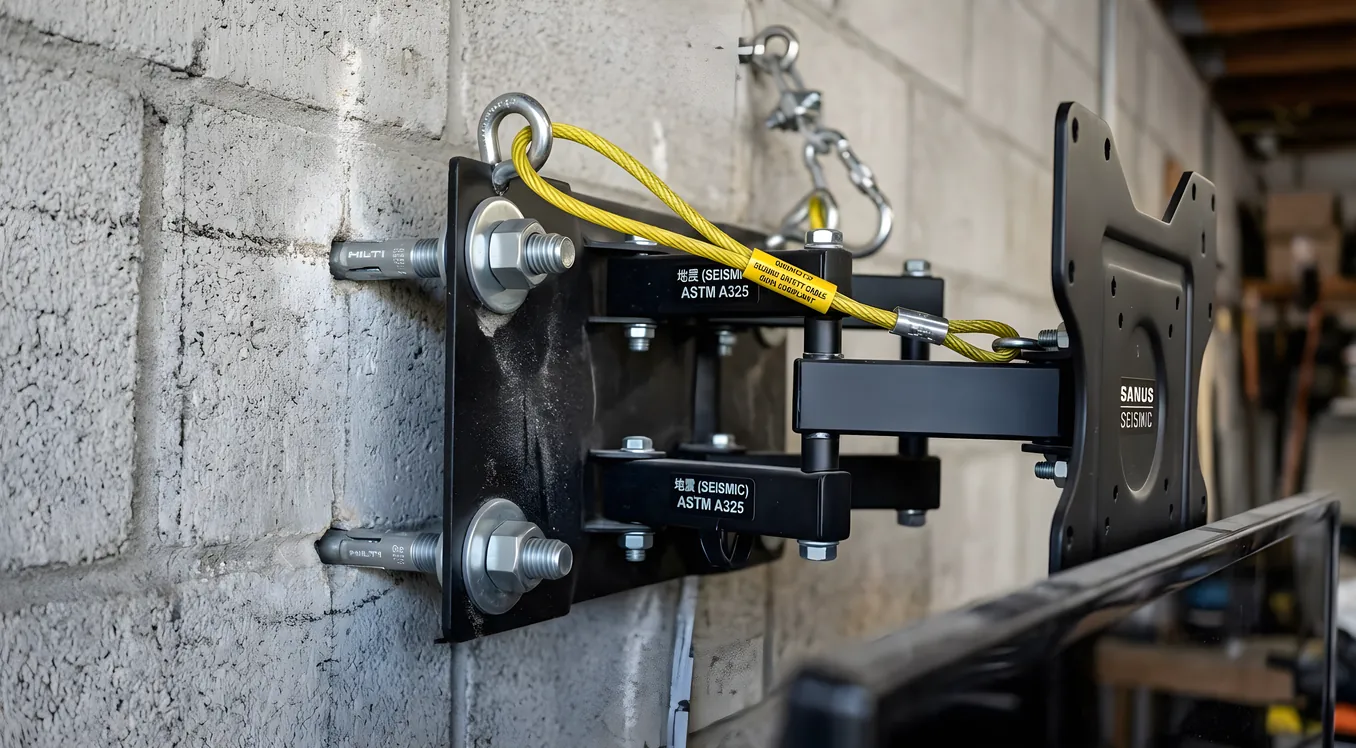
California’s seismic risk changes the physics of every AV installation. The Bay Area sits across multiple active fault systems, and the entire region falls into high-seismic zone classifications under both state and federal building standards. That means the assumptions that govern a home theater installation in, say, suburban Ohio — freestanding equipment rack in the corner, TV on a standard toggle-bolt mount, bookshelf speakers perched on stands — create a different risk profile here. During a significant shake, unsecured AV equipment becomes a hazard to people and to itself.
This is not a theoretical concern. The 1989 Loma Prieta earthquake caused widespread structural and non-structural damage across the Bay Area, and modern seismic science has consistently found that non-structural failures (toppled furniture, unsecured appliances, falling ceiling fixtures) account for a large share of injury risk in residential buildings. AV equipment is heavy, expensive, and often mounted at head height or on overhead surfaces. The installation choices you make before an earthquake determine the outcome during one.
California Seismic Zones and IBC Requirements for Non-Structural Components
The International Building Code (IBC) classifies structures into Seismic Design Categories (SDC) A through F, with D and E representing high-seismic zones. Most of the Bay Area falls into SDC D or E depending on the specific location’s proximity to fault lines and the soil type beneath the structure. Category D and E requirements apply not just to the building structure itself but to non-structural components — which includes suspended ceilings, lighting fixtures, HVAC equipment, and by reasonable extension, any heavy, permanently mounted AV equipment.
For residential installations, the IBC non-structural requirements translate practically into specific hardware choices. Anchor points must be rated for lateral forces, not just vertical load. The typical TV wall mount is rated by its maximum vertical weight capacity; seismic mounting requires a mount also rated for the lateral acceleration expected in a Category D or E zone. California’s own seismic codes under the California Building Code (CBC) adopt and in some cases exceed IBC requirements, and local jurisdictions including San Francisco, Oakland, and San Jose may add further requirements through permit conditions.
Understanding which requirements apply to your installation depends on whether the work requires a permit. In most Bay Area jurisdictions, mounting a TV to a wall does not trigger a permit. Installing a projector on a ceiling-mounted bracket, running new electrical circuits for an AV rack, or doing structural work to support heavy equipment generally does. When a permit is required, the seismic anchorage provisions in the CBC apply. When a permit is not required, following the same standards is still good practice.
TV Mounting: Lag Bolts, Stud Connections, and Positive Locks
The single most common seismic failure point in residential AV installations is a television mounted with toggle bolts into drywall rather than lag bolts into structural framing. Toggle bolts can hold a TV’s vertical weight under normal conditions. They do not hold well under the lateral forces generated by a seismic event. In a significant earthquake, a toggle-bolt-mounted TV can leave the wall entirely.
For any television over 40 pounds — which includes almost every 55-inch-and-up display on the market — the mount should attach to wall studs with lag bolts, not to drywall alone. The standard for seismic installations is at least two lag bolts per mounting point, going a minimum of 1.5 inches into structural framing (not just through the drywall to the stud face). In older Bay Area homes with plaster-over-lath walls, the approach is similar but requires attention to the lath spacing; the bolts need to reach the stud, not terminate in the plaster layer.
The mount itself also matters. Standard fixed mounts hold well seismically because there is no articulation point that can fail. Articulating and tilting mounts introduce pivot points and extension arms. For seismic installations, choose articulating mounts with positive locks on each axis, meaning the lock requires deliberate manual release rather than relying on friction or a set screw alone. Under sustained lateral motion, friction-based locks can release. A positive lock stays where it’s set until someone actively opens it.
VESA ratings on mounts specify the maximum weight capacity, but verify the rating accounts for dynamic load. Some budget mounts are rated at their weight limit under static conditions only. For seismic installations, choosing a mount rated at 1.5 to 2 times your TV’s actual weight gives adequate margin for the dynamic forces involved.
Projector Mounting: Ceiling Brackets and Safety Cables
Projectors present a more complex seismic problem than wall-mounted TVs because they hang from the ceiling rather than pressing against a wall. A lateral acceleration that pushes a TV toward the wall pushes a ceiling-mounted projector in the direction of any person or equipment below.
Ceiling projector mounts must attach to structural framing — joists or blocking — not to drywall alone. In a standard wood-frame Bay Area home with drywall ceilings, this means locating the joist, using lag screws with full thread engagement, and choosing a mount with a seismic rating or at minimum a very high weight rating relative to the projector’s actual weight. For heavier projectors (typically laser projectors over 15 pounds), consider adding blocking between joists during any open-ceiling phase of construction, which creates a rigid anchor point independent of joist spacing.
The second layer of protection is a safety cable. Run a steel aircraft-style safety cable through the projector’s carry handle or designated cable attachment point, then anchor it independently to the ceiling structure. The cable does not hold the projector in normal operation; the mount does. The cable catches the projector if the mount fails. Safety cable anchor points need to be rated for the projector’s weight under impact loading, not just static weight, because a falling projector generates substantially more than its hanging weight at the instant the cable arrests the drop.
Equipment Racks: Anchoring Requirements and Hardware Options
A free-standing equipment rack is one of the most hazardous objects in a home theater during a seismic event. Racks are tall relative to their base width, heavily loaded at mid-height or higher, and not inherently stable under lateral motion. A fully loaded 12U rack at 150-plus pounds can tip over at the acceleration levels produced by a moderate Bay Area earthquake.
The two acceptable approaches are wall anchoring and floor anchoring. Wall anchoring attaches the rack to a structural wall using L-brackets or purpose-built seismic straps, with fasteners going into framing rather than drywall. Floor anchoring attaches the rack to the floor framing using lag bolts through any flooring material; on concrete slab, masonry anchors achieve the same purpose. Either approach converts the rack from a freestanding mass that can topple into a fixed element that stays in place.
Seismic-rated rack accessories are worth specifying. Purpose-built rack angle brackets with seismic ratings, rack attachment straps, and seismic-compliant casters (if the rack needs to move for maintenance) all contribute to a more stable installation. For AV racks in dedicated theater rooms, the combination of floor anchoring and a wall-tie strap at the top of the rack provides redundancy: if one fails, the other limits the range of motion.
Speaker Mounting: Back Boxes, Positive Attachment, and Safety Wire
In-wall and in-ceiling speaker installations have a seismic advantage that surface-mounted speakers do not: the speaker is recessed into the wall cavity and retained by its mounting ring. The mounting ring, in turn, fastens to the drywall. For standard residential construction, this is usually adequate. For higher-end installations or in situations where the speaker is especially heavy, using a dedicated back box with structural attachment to the framing provides a more robust solution. Back boxes also serve acoustic purposes, isolating the speaker from wall cavity resonance, so they’re worth considering independently of seismic concerns.
Surface-mounted speakers require more deliberate seismic consideration. Any on-wall speaker heavier than about 5 pounds should attach directly to wall studs rather than relying on drywall anchors. For larger on-wall speakers, use lag bolts through the mounting hardware into the stud with appropriate thread engagement.
Bookshelf speakers on stands or shelves benefit from museum putty, Blu-Tack, or similar non-permanent adhesive between the speaker base and the surface it sits on. This does not prevent movement in a very large event but significantly reduces displacement during smaller earthquakes. For heavier passive monitors, a thin stainless safety wire attached to the speaker and a nearby fixed point (a shelf peg, a wall anchor, or the stand’s column) provides a fallback if the speaker shifts significantly.
Subwoofers are floor-placed and low to the ground, which reduces tip-over risk substantially. The primary seismic concern with subwoofers is the phenomenon sometimes called “walking” — where the vibration from normal operation causes the subwoofer to migrate across a hard floor over time. Rubber isolation feet serve two purposes simultaneously: they decouple the subwoofer vibration from the floor structure (improving bass performance) and increase the friction between the subwoofer and the floor, which reduces the tendency to walk during both normal operation and seismic motion.
Screen Mounting: Fixed-Frame Anchoring Requirements
A fixed-frame projection screen is one of the larger objects hung on a home theater wall. Screens range from around 30 pounds for a smaller residential frame to over 100 pounds for large-format screens in dedicated rooms. At those weights, the mounting requirements are similar to the TV mounting discussion: attachment to structural framing with appropriate fasteners at multiple points.
The practical standard for a fixed-frame screen in a seismic zone is at least four anchor points, each connecting to a wall stud rather than terminating in drywall. Screen manufacturers typically specify anchor locations along the frame perimeter; verify that those locations align with or can be adjusted to reach stud positions. When the provided hardware includes only drywall anchors, replace them with lag bolts sized for the stud material and the screen weight. The slight additional effort at installation time eliminates a failure mode that has visible and potentially costly consequences.
Insurance Documentation and Earthquake Coverage
Standard homeowner’s insurance policies do not automatically cover earthquake damage. In California, earthquake coverage is typically a separate endorsement or a separate policy. The California Earthquake Authority (CEA) provides residential earthquake policies through most California insurers.
Whether you carry earthquake insurance or not, photographic documentation of your AV equipment installation before any seismic event matters for claims purposes. Photograph the mounting hardware from multiple angles, the stud locations relative to mount attachment points, and the overall room layout. Keep purchase records, serial numbers, and installation receipts separate from the equipment itself (a cloud backup of a photo folder is sufficient).
If you do carry earthquake coverage, understand the deductible structure. CEA policies typically carry a 5 or 10 percent deductible calculated on the dwelling value, not the claim value. For a home valued at $800,000, a 10 percent deductible means the first $80,000 in damage is out of pocket before coverage begins. High-end AV equipment may fall below that threshold in isolation, making proper mounting even more important from a financial recovery standpoint.
Beyond Code: Safety Cables, Anti-Tip Straps, and Positive Locks
Code compliance is the floor, not the ceiling. Several practices that go beyond minimum requirements are straightforward to implement and meaningfully improve outcomes in a significant event.
Safety cables on ceiling-mounted equipment are not required by most residential building codes but are standard practice in commercial AV installations governed by AVIXA standards. Applying the same practice to residential projectors and ceiling-mounted speakers costs relatively little and prevents the worst failure mode: equipment that falls from overhead.
Anti-tip straps for equipment racks are similarly simple. A strap connecting the rack top to the wall behind it does not interfere with normal use and provides a reliable secondary restraint if the floor anchor is under-specified or if the rack is placed where floor anchoring is impractical.
For any articulating mount, verify the positive lock mechanism before installation is complete. Test the lock under load: extend the arm, lock it, and apply lateral pressure by hand. The mount should not shift. If it does, the lock is not functioning as a seismic restraint. Address the mechanism before the display goes on the wall.
The broader principle here connects to how California residents generally approach seismic preparedness: the work done before an earthquake determines the outcome during one. AV equipment installed to seismic standards behaves predictably in a shake. Equipment installed to assume nothing will shake requires decisions and remediation after the fact, at a much higher cost in time, money, and potential injury risk.
For questions about building codes that apply to AV installations in your jurisdiction, the relevant authority is typically your city or county building department. For display-specific mounting guidance, the TV mounting section covers wall types, mount hardware, and best practices in detail. For rack selection and configuration, AV racks covers sizing, ventilation, and hardware organization.