AV Equipment Racks: Ventilation, Access, and Cable Management
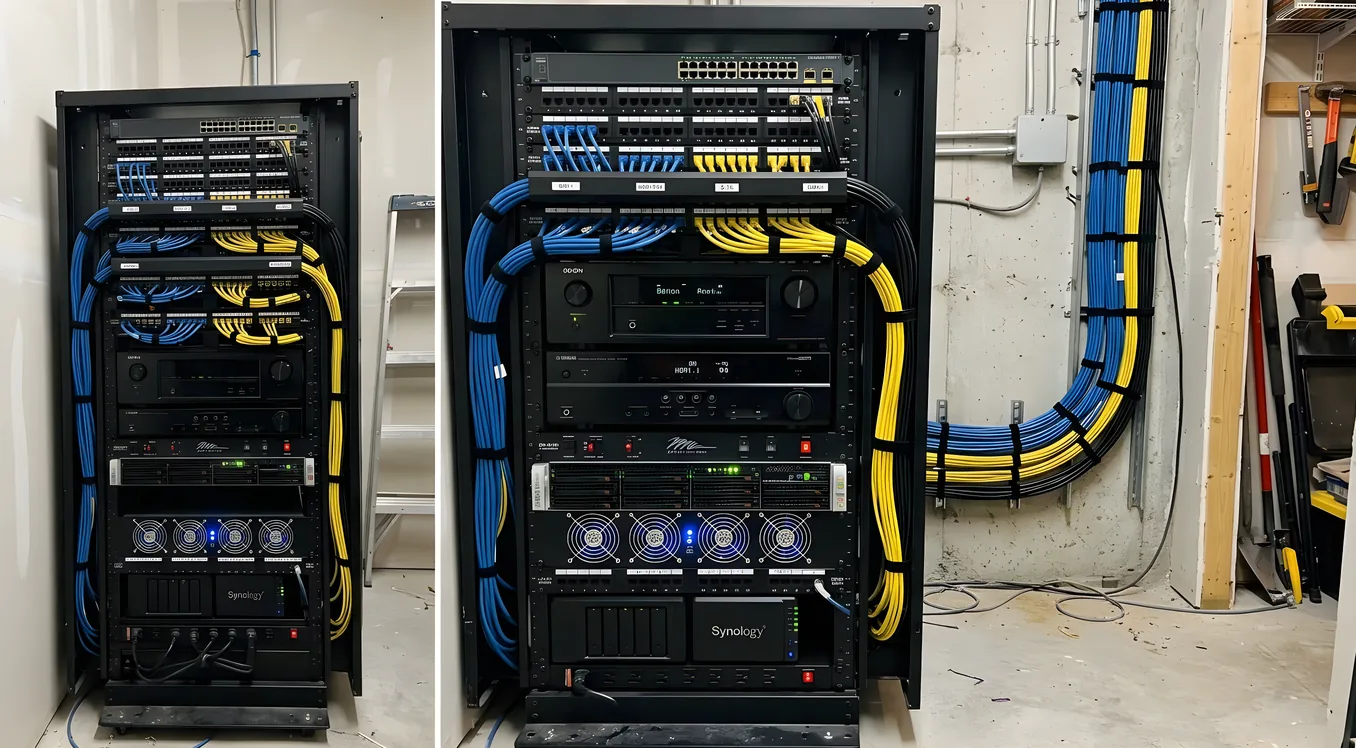
An AV equipment rack is not just a shelf. It determines whether your gear runs cool or throttles under load, whether a cable replacement takes three minutes or forty-five, and whether your theater room looks finished or like a cable explosion in progress. Getting the rack right before equipment goes in saves significant rework later.
Rack Types: Open Frame, Enclosed Cabinet, Wall-Mount, and Closet-Based
The four main form factors each suit different rooms and priorities. Choosing among them requires thinking about access frequency, thermal load, and how much the rack itself will be visible.
Open-frame racks expose all four sides of the installed equipment. Airflow is unrestricted because there are no panels to trap heat. Middle Atlantic’s ERK and ERK-SL series are common open-frame choices in the residential AV market; they use standard 19-inch EIA rail spacing with adjustable depth. Open-frame racks work well in dedicated equipment rooms or closets where appearance is secondary to performance and access. The downside is that everything is visible, including every cable, which raises the bar on cable dressing.
Enclosed cabinets surround the equipment on all sides, typically with a solid or vented rear panel and a front door. Salamander Designs builds enclosed cabinets specifically for home theater use, with furniture-grade finishes intended for living rooms and media rooms. The aesthetic benefit is real, but the thermal math becomes more demanding. A fully enclosed rack with 1,200 watts of operating equipment and no active ventilation will see internal temperatures rise well above ambient. Enclosed cabinets require deliberate ventilation planning, not an afterthought.
Wall-mount racks attach directly to a stud-backed wall surface, typically in sizes from 4U to 12U. Sanus and Middle Atlantic both make articulating wall-mount brackets that swing the rack face outward for rear access. These work well for smaller equipment sets: a streaming receiver, a network switch, a power conditioner, and a single amplifier. Above 8U, the leverage on wall anchors becomes a structural concern, and floor-standing options become more practical.
Closet-based installations use an existing closet or utility room as a dedicated equipment space, often with a floor-standing open-frame rack inside. The equipment stays completely out of the theater room, which eliminates fan noise, blinking standby LEDs, and heat load from the listening position. The tradeoff is distribution distance: video must travel via HDBaseT or fiber HDMI, and audio control requires an IP-based or RF control system rather than direct IR. For serious installs, closet-based placement is worth the added cost of distribution gear.
Rack Units (U): How Much Space You Actually Need
Rack space is measured in rack units, where 1U equals 1.75 inches of vertical height. A standard AV receiver occupies 2U to 3U depending on the chassis. A separate power amplifier runs 2U to 4U. A 4K UHD player is typically 2U. A power conditioner in a 1U or 2U format plus a 1U patch panel or 1U cable management bar adds up quickly.
For a two-channel or 5.1 system with a single receiver, streaming player, UPS, and power conditioner, a 12U rack is usually sufficient with room to spare. A more complex install with a separate pre-amplifier/processor, multichannel amplifier, streaming transport, disc player, network switch, and power distribution typically lands in the 20U to 28U range. It is worth sizing up by at least 4U beyond your current equipment count. Adding a rack unit costs nothing at build time and avoids the much larger cost of replacing an undersized rack two years later.
Depth Requirements for Receivers, Amplifiers, and Streaming Devices
Rack depth is often overlooked until equipment arrives. AV receivers typically run 15 to 17 inches of chassis depth, plus an inch or two for rear-panel connectors and cable bend radius. That puts practical depth requirements at 18 to 20 inches behind the front rail. Salamander Designs Synergy cabinets and Middle Atlantic BGR series racks accommodate depths up to 24 and 28 inches respectively, which leaves genuine clearance behind large receivers.
Separate power amplifiers, particularly Class A/B designs with large heat sinks, can run 18 to 22 inches of chassis depth. The heat sinks are often the deepest component. When specifying a rack for a separate amplifier, confirm the amplifier’s published depth (not including connectors) against the rack’s usable internal depth, then add at least 2 inches for cable clearance at the rear.
Streaming devices and small-form-factor computers present a different problem: they are often too shallow for standard rack shelves without a custom bracket or half-rack shelf. A 1U vented shelf from Middle Atlantic or a rack-mount shelf from AC Infinity accommodates these smaller components while keeping them within the cooled airspace of the rack.
Ventilation: Passive vs. Active Cooling
Heat is the primary cause of early component failure in AV racks. Receivers and amplifiers generate substantial thermal output at sustained listening levels: a mid-range receiver running at moderate load produces roughly 100 to 150 watts of heat, and a multichannel amplifier can double or triple that figure. Stacking components without airflow management compounds the problem because heat from lower components rises directly into the equipment above.
Passive ventilation relies on convection and natural airflow through vented rack panels, open sides, or open rack frames. It works well for low-density installs in open-frame racks with good room circulation. The precondition for passive ventilation is that rack-mounted equipment can breathe on all sides. Passive systems require zero ongoing maintenance and produce no noise, but they cannot move enough air in high-load enclosed environments.
Active ventilation uses fans to force air through the rack. AC Infinity makes the CLOUDPLATE rack fan systems specifically for this application, with temperature-controlled fan speeds, quiet brushless motors rated for long service life, and dual-zone versions that mount at both top and bottom of the rack. The standard approach is to pull cool air in at the bottom of the rack and exhaust warm air out the top, following the natural direction of convection. A two-fan CLOUDPLATE T9 unit produces around 100 CFM, which is adequate for most residential racks running two to four pieces of heat-generating equipment.
Temperature monitoring closes the loop on whether your ventilation strategy is working. AC Infinity’s fan controllers include thermostats that adjust fan speed based on internal temperature. For installations where the rack is in a closet and not directly observable, an inexpensive wireless temperature sensor placed in the upper third of the rack provides peace of mind and an early warning when something changes (a new component added, ventilation blocked, fan failure).
Enclosed cabinets that do not have active ventilation will trap heat. The rule of thumb in the installation trade is that an enclosed rack without cooling can run 15 to 25 degrees Fahrenheit above ambient room temperature under load. If your rack closet is 75 degrees and the enclosed cabinet adds 20 degrees, equipment is running at 95 degrees Fahrenheit, which is within or beyond the thermal limits of some consumer-grade gear.
Cable Management: Velcro, Combs, Patch Panels, and Labeled Runs
Cable management inside an AV rack serves two purposes: it keeps heat-trapping bundles away from air paths, and it makes future changes possible without disturbing half the system.
Velcro ties are the correct tool for bundling cables in racks. Zip ties are permanent and must be cut to change a single cable in a bundle. Velcro allows individual cables to be added or removed without disturbing the rest. Use 8-inch Velcro ties at regular intervals of 6 to 10 inches along bundled runs.
Cable combs separate parallel runs and keep them organized where they exit equipment. They are more useful for clean show installs and visible racks than for closet gear, but even in equipment closets they make tracing individual cables faster.
Patch panels matter most for audio control and network connections. A 1U or 2U Ethernet patch panel in the rack, with runs to wall plates throughout the room, means changing a network connection requires moving a patch cord at the rack face rather than tracing a cable behind the wall. The same logic applies to HDMI distribution: routing signals through a distribution hub at the rack, rather than running individual HDMI cables point to point, produces a much cleaner and more serviceable installation. See the wiring guide for source-to-rack and rack-to-display routing recommendations.
Labeled runs are not optional if the system will ever be serviced by anyone other than the original installer. Label both ends of every cable before installation, not after. A P-touch or Brady label maker with heat-shrink labels is the standard approach for professional installs. For DIY work, even masking tape and a marker at each connector end saves significant troubleshooting time.
Horizontal cable management panels (1U bars with D-rings or finger ducts) installed between each piece of equipment route cables horizontally to the sides of the rack before they descend to the rear. This keeps the front face clean and prevents cables from being pinched by rack-mounted equipment above.
Remote Location: Placing Equipment in a Separate Room
Moving all AV equipment to a closet or dedicated equipment room is the single change that most improves the acoustic character of a home theater. Fans, hard drives, disc transport mechanisms, and the slight electromagnetic interference from switching power supplies all disappear from the listening position. The theater room temperature also drops meaningfully, since the rack no longer contributes heat load to the space.
Remote placement requires solving two problems: video distribution and control.
Video distribution over long runs from a remote equipment room to a projector or display uses HDBaseT for distances up to 100 meters over a single Category 6 cable. HDBaseT carries 4K HDR HDMI signals, control signals, and power over a single run. For distances over 100 meters or runs through conduit with many bends, active fiber HDMI solutions handle longer distances without signal degradation. The electrical planning guide covers conduit sizing and pull-point placement for distribution runs between equipment rooms and theater rooms.
IR and IP control replaces the line-of-sight IR remote signals that won’t reach a closed closet. An IP-connected control system (Lutron, Control4, or a simpler solution like Global Cache’s network-to-IR adapters) accepts commands over the network and outputs IR directly to equipment inside the rack. Discrete IR emitters stick to the IR receiver window on each component. This approach gives the same one-button control as direct-IR while keeping equipment completely out of sight.
Power Conditioning and UPS Protection
A power conditioner filters AC line noise and provides protection against voltage spikes. Furman and Panamax are the two dominant brands in home theater power conditioning. Both offer residential-class conditioners that clean the AC supply, provide sacrificial MOV surge protection, and include sequenced power-on outputs that bring equipment up in the correct order (source components before amplifiers, for example).
Furman’s Elite series (PL-Pro DMC, Elite-15 PF i) adds series-mode surge protection rather than MOV-only clamping. Series-mode protection absorbs surge energy rather than diverting it, and it does not degrade over time the way MOV protection does. For installations where lightning risk is a concern, the upgrade to series-mode protection is worth the price difference.
SurgeX builds industrial-grade series-mode protection in rack-mount form factors used in broadcast and live-event production. SurgeX units are specified by installers who want the most durable protection available and are willing to pay commercial-grade prices for residential applications.
UPS (Uninterruptible Power Supply) serves a different function from conditioning. A UPS provides battery backup so equipment can survive a brief power outage or brownout without shutting down. For projectors specifically, this matters because lamp-based projectors require a cool-down period after use: cutting power mid-cool-down can shorten lamp life significantly and, in some cases, cause premature lamp failure. A UPS rated for 10 to 15 minutes of runtime gives a lamp-based projector time to complete its cool-down cycle even after a power failure. Laser projectors do not have this concern, but a UPS still protects against the voltage events that occur at the moment of outage, which can be more damaging than a sustained outage itself.
When sizing a UPS for an AV rack, add the wattage draw of all equipment you want protected, then choose a unit rated for at least 1.5 times that load. APC, CyberPower, and Tripp Lite all make rack-mount UPS units in 1U and 2U form factors suitable for AV applications.
Building the Rack Before the Room Is Finished
The most practical advice about AV equipment racks is temporal: decide on the rack format, size, and placement location before walls are closed. Conduit routes and wall plates require knowing where the rack will live. Power circuits need to be planned around the rack’s location and load requirements. HVAC for the equipment room (if one exists) is far easier to add during construction than after.
An AV equipment rack built on a solid plan, with correct sizing, active cooling, organized cable management, and appropriate power protection, runs reliably for years without intervention. The same rack put together as an afterthought produces a service call within eighteen months.