Control4 for Home Theater: What It Does and What It Costs
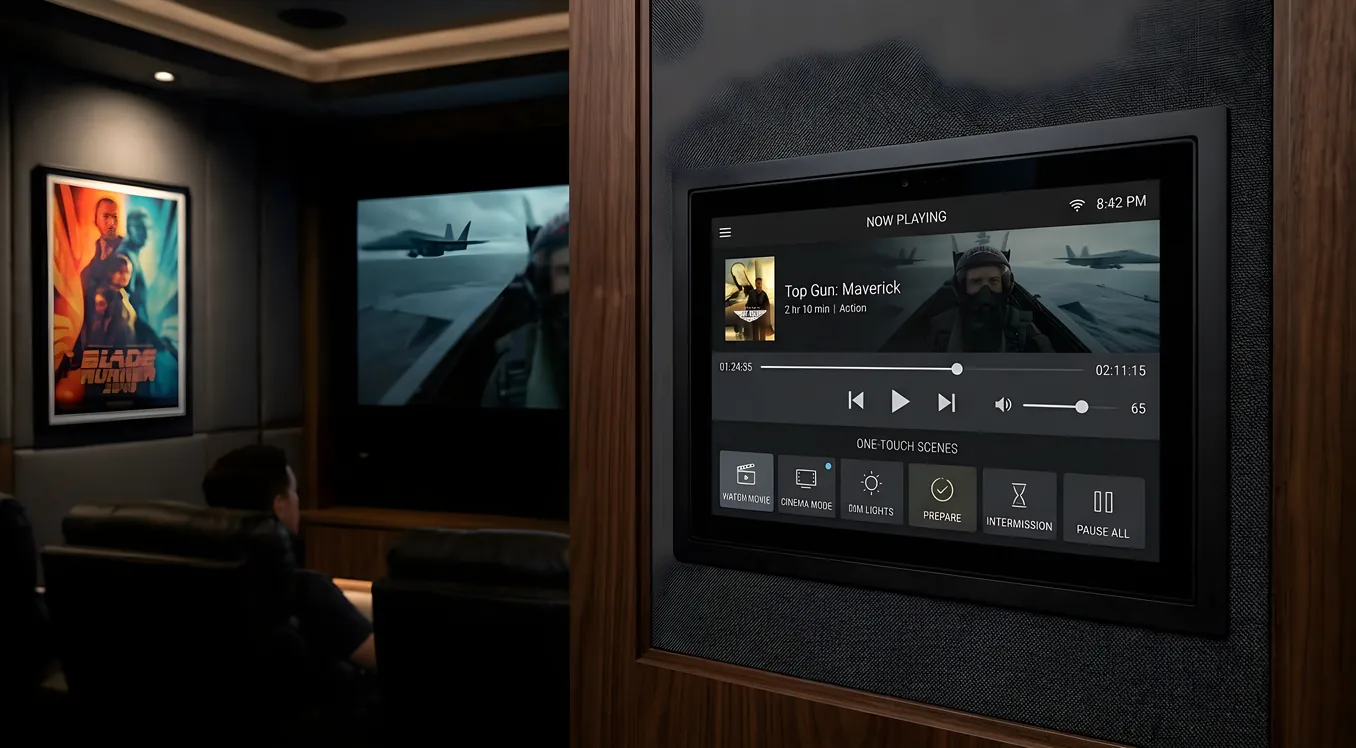
Control4 is a whole-home automation platform built around the premise that every system in your house should work together. Lights, climate, security cameras, door locks, and the entire AV stack all connect to a single controller. In a home theater, that means pressing one button and having everything happen at once: lights dim, the projector screen drops, the projector warms up, the receiver switches to the right input, and the film starts. No juggling three remotes, no adjusting settings on four separate apps.
The platform is dealer-installed and dealer-programmed. You cannot buy a Control4 controller at a retail store, configure it yourself, and call it done. That distinction shapes everything about the experience, including the cost.
Control4 OS 3 and How the Interface Works
Control4 OS 3 is the software layer that runs on every controller and appears on every screen connected to the system. The same interface presents itself across touchscreens mounted on the wall, handheld remotes, iOS and Android phones, and an on-screen display (OSD) overlaid on your TV or projector.
The OSD is particularly useful in the theater. Without picking up a remote or unlocking a phone, you can navigate the Control4 interface directly on your display using the remote’s directional controls. Source selection, volume, lighting adjustments, and climate control are all accessible from the couch without switching devices.
OS 3 introduced a redesigned interface with larger graphical elements, faster navigation, and a persistent control bar across the bottom of the screen. The system also supports personalized “favorites” for each room, so the theater interface shows only what’s relevant to that space rather than the full house inventory.
What Happens When You Press “Watch Movie”
Automation scenes are the core feature that separates Control4 from a universal remote. Rather than controlling one device at a time, a scene triggers a sequence of actions across multiple systems simultaneously.
A typical “Watch Movie” scene in a Control4 theater might do the following in sequence: dim the main lights to 10%, turn off the overhead lights entirely, lower the motorized projection screen, switch the AV receiver to the Blu-ray input, power on the projector and wait for the lamp to reach operating temperature, and then set the volume to a preset level. Some integrators also include thermostat adjustments, door lock confirmation, and even window shade control in the same scene.
That entire sequence executes from a single button tap. “Pause Movie” can reverse some steps: bring the lights back to 30%, mute the audio, and put the screen in a wait state. “End Movie” restores the room to its baseline state. The programming logic behind these scenes is what the dealer builds during the installation process, and the complexity you can reach is substantial.
The Halo Remote
Control4’s flagship remote is the Halo, a rechargeable, backlit remote with a combination of hard buttons and a color touchscreen display in its center section. The screen shows artwork, source status, and contextual controls that change based on what the system is doing. Playing a movie shows movie controls; navigating a music library shows track information and playback controls.
Hard buttons are customizable. A dealer programs which functions they trigger, so the physical layout reflects how you actually use the theater rather than generic industry defaults. Frequently used scenes can get dedicated buttons. Less common functions live behind the touchscreen.
The Halo also supports voice control through integration with Amazon Alexa and Google Assistant. Saying “Alexa, watch a movie” in a properly configured system triggers the same scene as pressing the button, which is useful when the remote isn’t in hand.
The Halo charges in a cradle that also serves as a home for the remote when the room is not in use.
Device Integration: IP, RS-232, and IR Control
Control4’s driver library is one of the broadest in the industry. Drivers are software modules that tell the Control4 system how to communicate with a specific device. The library includes thousands of drivers for televisions, projectors, AV receivers, cable boxes, streaming devices, disc players, lighting systems, climate systems, security panels, and more.
Control4 uses three primary communication methods. IP control sends commands over your home network, which means two-way communication is possible: the system can confirm that a projector has reached operating temperature before lowering the screen, for example. RS-232 is a serial connection method used by many professional AV components, particularly projectors and matrix switches, that offers reliable bidirectional control. IR (infrared) is a fallback for devices that only accept the same signals a standard TV remote would send, which is one-way and cannot confirm state.
The distinction between IP/RS-232 and IR matters in automation scenes. One-way IR control means you’re instructing without feedback. Two-way IP control means the controller knows what the device is actually doing and can sequence events accordingly.
Lighting Integration
Control4 manufactures its own lighting line, including dimmers, switches, and keypads that integrate natively with the controller. In a theater, this allows precise dimming to any level and instant scene recall from any keypad button in the room.
If a home already has Lutron RadioRA or Caséta lighting, Control4 integrates with those systems through dedicated drivers. Leviton and other lighting brands are similarly supported. The Control4 system communicates with the lighting system as a whole rather than replacing it, so existing hardware can often stay in place.
Keypads can be programmed with any function. A four-button keypad in the theater hall might have “Watch Movie,” “Watch TV,” “All Lights On,” and “All Off,” with each button triggering a full scene rather than a single light circuit.
Multi-Room Audio and Video Distribution
Control4 supports audio matrix and video distribution throughout the house. A central audio source, such as a music streaming service running through a Control4-integrated streaming device, can route to any room with Control4 audio equipment. Each zone controls independently: the kitchen might play a podcast while the theater plays a film.
For video distribution, Control4 integrates with HDMI matrix switches and AV-over-IP systems that route video to multiple displays from a central source rack. In large homes with displays in multiple rooms, this eliminates the need for redundant source equipment in each space.
The theater is typically one zone among many. The advantage is that the same Control4 interface controlling the theater also controls the rest of the house, so adjusting music in other rooms before a movie starts doesn’t require switching systems.
The Dealer-Only Model
Control4 is not a consumer product. It is sold exclusively through authorized dealers, and installation and programming require a dealer. This is not simply a business restriction; the system architecture assumes professional setup.
A Control4 dealer handles hardware selection, system design, installation, and programming. The programming work is substantial: every device must be configured, every scene must be built, and every driver must be set up correctly. A theater installation with a dozen integrated devices and a complete scene library might take a dealer eight to twelve hours of programming work.
After installation, Control4 Go is an app that gives homeowners limited customization ability without a dealer visit: reordering favorites, adjusting some settings, and creating basic scenes from existing programmed elements. Complex changes, adding new devices, or restructuring the scene logic still require a dealer.
This model produces a reliable, deeply integrated system, but it also means you cannot make significant modifications yourself. If your dealer relationship ends poorly, finding a new dealer to take over an existing system is possible but adds friction.
Comparing Control4 to Savant and Crestron
Control4 sits between the consumer and fully custom markets. Savant targets a similar high-end residential buyer and emphasizes Apple ecosystem integration and a refined interface, often at higher programming costs. Crestron is the commercial-grade option, dominant in boardrooms and large estates, with commensurately higher hardware and programming costs and a steeper dealer certification requirement.
Control4 is generally the most accessible of the three in terms of dealer availability and system entry cost, while still offering deep integration capabilities that consumer products like SmartThings or Apple HomeKit cannot match.
What Control4 Costs in a Home Theater
The hardware and programming costs for a Control4 home theater installation fall into predictable categories.
The central controller costs between $500 and $1,500, depending on the model. Entry-level controllers handle smaller systems; the higher-end EA-5 and larger models support complex integrations with more simultaneous connections.
Programming labor is typically the largest single line item: $1,500 to $5,000 for a theater installation, depending on system complexity, number of devices, scene count, and the dealer’s hourly rate. A simple theater with a single scene and half a dozen devices sits at the low end. A theater with custom scenes for multiple modes, integration with a full lighting system, HVAC control, and security feed display sits at the high end.
Touchscreens run $500 to $2,500 each. A wall-mounted touchscreen in the theater is useful but not required if the Halo remote and phone app cover your needs. Many installations include one touchscreen per major room and rely on handheld control elsewhere.
Putting these together: a complete Control4 home theater installation, including controller, Halo remote, basic lighting integration, driver setup for six to eight AV devices, and programming, typically runs $5,000 to $12,000. Systems with full-house integration, multiple touchscreens, dedicated lighting hardware, and complex scene programming regularly reach $20,000 to $25,000 or more.
What the System Gets Right and Where It Falls Short
Control4’s reliability record in professionally installed systems is strong. The platform has been refined over two decades, the driver library is mature, and the company’s update history shows sustained software support. For buyers who want a theater that works exactly the same way every time, this track record matters.
The depth of integration is genuine. Scenes that coordinate a projector, receiver, screen, three separate lighting zones, a thermostat, and a security panel in a single button press are not marketing concepts. They work because the system was designed from the ground up to handle that kind of cross-device coordination.
The limitations are equally real. The dealer dependency is not a minor inconvenience. If you want to add a device, change a scene, or troubleshoot a behavior you don’t understand, you typically need to schedule a service call. Costs for ongoing programming changes add up over time. Some owners find this acceptable given the system quality; others find it frustrating after the first major change request.
The ecosystem is proprietary. Control4 hardware works best with Control4 drivers, and while third-party integrations are numerous, devices outside the driver library require custom driver development, which adds cost and dependency on a single programmer.
For buyers who prioritize a set-it-and-forget-it theater that performs reliably without ongoing owner involvement, Control4 is worth the cost. For buyers who want to tinker, reconfigure, and modify their system on their own terms, the dealer model will chafe over time.