Crestron for Residential Home Theater: Enterprise-Grade Control at Home
Crestron built its reputation in corporate boardrooms, hotel ballrooms, and performing arts centers before it ever appeared in a living room. That history shapes everything about the product: the hardware tolerances, the programming model, the dealer ecosystem, and the price. A Crestron residential home theater system is not a consumer product with a premium price. It is a commercial product installed in a home, and the distinction matters before you commit to anything.
This guide covers what Crestron actually offers for residential use, where it outperforms the competition, and where the complexity and cost make the alternatives worth considering.
Crestron Home OS: The Residential Platform
Crestron has two programming environments, and they live on opposite ends of the complexity spectrum.
The traditional Crestron platform runs on SIMPL Windows, a proprietary programming language that custom AV integrators have used for decades. A skilled programmer can make Crestron do almost anything with SIMPL. The tradeoff is time: programming a full home in SIMPL Windows can take a week or more of billable integrator hours.
Crestron Home OS is the company’s answer to that complexity ceiling. Introduced to accelerate residential deployments, it uses a configuration-based setup rather than line-by-line programming. An integrator working in Crestron Home can commission a mid-sized system in a day or two rather than a week, which reduces labor cost without reducing system capability. The platform handles the same devices, the same protocols, and the same level of integration. It simply gets the setup time down to something reasonable for a residential project.
Both paths end at the same hardware. What changes is how quickly the integrator gets there.
AV Distribution: Commercial-Grade Infrastructure
The core of any multi-room Crestron system is whole-home AV distribution, and Crestron’s approach here reflects its commercial roots.
DM NVX (Digital Media Network AV Encoder/Decoder) distributes 4K HDR video and audio over a standard IP network. Each room gets an NVX decoder on the wall or rack. Sources connect to encoders at the equipment rack. A regular Ethernet switch carries everything in between. This AV-over-IP architecture means no proprietary cable runs between rooms, long-distance signal integrity without amplification concerns, and the ability to add rooms by adding a switch port and a decoder. In a large estate where the equipment room is 200 feet from the primary theater, this approach is genuinely superior to any analog distribution method.
DM-MD matrix switches offer the traditional hardware approach for systems where a fixed matrix is preferred over an IP network. These units switch signals between a set number of inputs and outputs at the hardware level, with no network latency and a deterministic signal path. For a dedicated theater where the equipment rack is close to the display, a matrix switch can be cleaner than running everything through an IP infrastructure.
The choice between these approaches typically depends on system size and how the client plans to expand. IP scales more gracefully; matrix switches suit fixed-footprint installations.
Control Processors: 3-Series and 4-Series
Crestron’s control processors are the brain of the system. Every touchpanel, keypad, sensor, and device in the installation reports to a processor, and the processor makes decisions about what to do with that input.
The 3-Series processors have been the workhorses of Crestron installations for years. They run SIMPL Windows programs reliably and have a well-established ecosystem of drivers, modules, and integrator experience behind them.
The 4-Series processors add meaningful upgrades: faster processing, more memory, support for HTML5 user interfaces rather than proprietary Crestron graphics, and native integration with Crestron Home OS. For new installations, the 4-Series is the default choice. The hardware can handle a full estate with dozens of rooms, hundreds of lighting zones, and complex AV routing without running short on processing headroom.
What processors give a Crestron system that consumer platforms cannot match is determinism. When you press a button on a Crestron panel, the processor executes the logic synchronously. There is no app polling a cloud server. There is no update downloading in the background. The lights dim, the projector powers on, and the receiver switches inputs in the sequence the programmer defined, every time.
Touchpanels and Remotes
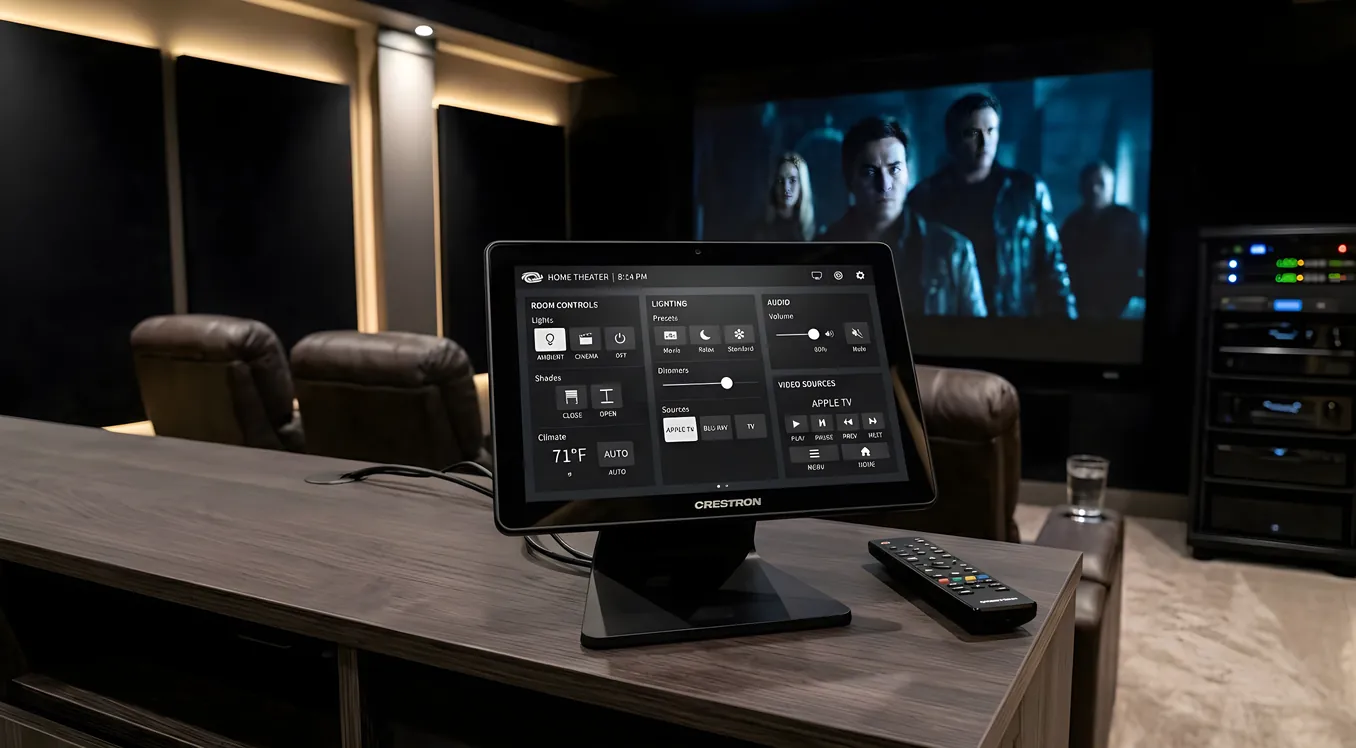
TSW-1070 is the standard 10-inch wall-mount touchpanel for theater and room control. It runs a customized interface designed by the integrator, not a generic app. Button layouts, labels, background images, and logic all reflect the specific installation. A client with four different lighting scenes for their theater does not get a generic slider interface; they get four labeled buttons that mean something to them specifically.
TSR-310 is the handheld remote, designed to sit on the couch armrest without disappearing into the cushions. It has a physical button array for the controls users reach most often, paired with a touchscreen for more complex navigation. In a dedicated theater where the wall panel is behind the seating position, the TSR-310 handles daily use without requiring anyone to get up.
Both devices run the same interface and the same underlying logic. A change the programmer makes to the system propagates to both automatically.
Crestron Flex: Home Office Meets Home Theater
Crestron Flex is the company’s video conferencing hardware line, originally designed for conference rooms. In a residential context, it addresses a real problem: dedicated theaters make poor Zoom rooms because the display is too large, the camera position is wrong, and the audio system is optimized for one-way playback rather than two-way conversation.
Crestron Flex integrates directly with Microsoft Teams, Zoom, and similar platforms. When a homeowner needs to take a call, the system reconfigures: the display changes input, the camera positions correctly, the microphone and speaker routing shifts to a mode appropriate for conversation, and the theatrical lighting comes up. When the call ends, the system returns to whatever state it was in before.
This has become a meaningful selling point for buyers who work from home and want one room that handles both functions without manual reconfiguration.
Lighting Control
Crestron’s lighting line integrates with the control system at the processor level, meaning lighting scenes are part of the same programming environment as AV control. A “Movie” scene that dims the overheads to 10%, raises the screen LED strips, and activates the projector is a single button press that coordinates lighting, video, and audio simultaneously.
CLW keypads mount in standard electrical boxes and offer tactile button control for occupants who prefer a physical switch over pulling out a touchscreen. In a theater where the same lighting scene gets triggered every day, a CLW keypad at the door is faster and more intuitive than any app.
Occupancy sensors allow the processor to respond to room presence automatically. An empty room can shut down its system after a defined timeout. A room someone enters can bring up a preset lighting level before they reach for any control.
Shade motor integration adds motorized window treatments to the same programming environment. A morning scene that opens the shades, raises the lights, and turns on a news source, triggered by a single button, is standard Crestron territory.
Custom Programming: The Deepest Capability Floor
The comparison point between Crestron, Control4, and Savant comes back to programming depth more than any other factor.
Crestron is the most customizable system in the residential market. There is no practical ceiling on what a programmer can build in SIMPL Windows. Device drivers exist for most commercial AV equipment on the market, and for anything that lacks an official driver, a programmer can write one. Custom logic can accommodate edge cases that no consumer platform would anticipate: a theater room that switches configuration when the homeowner’s kids have a movie party versus when adults have a screening with controlled access; a lighting scene that calculates sunset time and adjusts automatically based on geographic location; a control interface that presents different options depending on who authenticated to the system.
This flexibility has a cost. Crestron programming requires a certified Crestron programmer, a credential that takes time and training to earn. The programmer learns your specific requirements, writes the code, tests it, and returns to debug any changes you request later. You are not adjusting a preference in a phone app; you are calling your integrator.
For buyers who want to change settings themselves, Control4 has built a strong app-based configuration tool that lets dealers and end users make adjustments without reprogramming. Savant offers a well-regarded interface for Apple device users. Crestron Home OS has closed some of this gap, but the system is still fundamentally integrator-managed.
What Crestron Costs
A full Crestron home theater and home automation system is the most expensive of the major three platforms when configured comparably.
Expect to spend between $15,000 and $75,000 for a combination of a dedicated theater room, whole-home AV distribution, lighting control, and climate integration in a large home. The wide range reflects room count, hardware tier, and programming complexity. A single dedicated theater with lighting control and basic smart home integration on the lower end; a full estate with multiple theaters, distributed audio in a dozen zones, comprehensive lighting, motorized shades, and custom programming on the upper end.
Hardware accounts for a portion of this. Crestron equipment carries commercial-grade pricing because it is commercial-grade hardware. A DM NVX encoder costs substantially more than the equivalent from consumer AV-over-IP alternatives. The TSW-1070 costs more than a comparable third-party touchpanel.
Labor accounts for the other portion. Certified Crestron programmers charge accordingly, and a complex installation warrants the cost because the programming is what makes the hardware worth owning.
When Crestron Is the Right Choice
The honest answer is that Crestron is not the right system for most homes. It is the right system for specific situations where its advantages are load-bearing.
Large estates with many rooms benefit from Crestron’s scalability. An IP-based distribution backbone like DM NVX handles fifty rooms as cleanly as it handles five. The programming model scales with complexity rather than fighting it.
Clients with commercial reliability requirements benefit from Crestron’s track record. The same hardware that runs a hospital auditorium or a university lecture hall runs a home theater. Uptime standards from those environments carry over.
Clients who need unusual integrations benefit from Crestron’s open programming environment. A homeowner with specialized access control requirements, security system integration, or industrial building management systems that need to talk to the home system can connect them in Crestron in ways that consumer platforms cannot accommodate.
Clients who want everything to stay on-premises and never rely on a cloud server benefit from Crestron’s architecture. The processor runs locally. Scenes and automations work without internet connectivity.
For buyers who want broad device compatibility at a lower entry cost, Control4 operates the widest dealer network in residential smart home and supports a substantial third-party driver library. For buyers who are deeply embedded in the Apple ecosystem, Savant’s Apple integration is the best available in a native residential platform. Crestron sits above both on capability and cost, and the gap is real in both directions.
Working with a Crestron Dealer
Crestron does not sell direct. All residential systems go through Crestron-authorized dealers, and many of those dealers also hold Crestron Home certification that qualifies them for the OS-based deployment path.
Finding the right dealer matters as much as choosing the platform. The programming quality, commissioning thoroughness, and ongoing support relationship determine how well the system works for years after installation. A well-programmed Crestron system running on solid hardware should require minimal intervention after the initial setup period. A poorly programmed one requires constant dealer callbacks for issues that the programming should have anticipated.
Request references from residential installations of similar complexity. Ask specifically about response time for programming changes. Understand whether the dealer has staff who handle Crestron Home deployments or relies exclusively on SIMPL Windows specialists. These questions separate dealers who know residential from those who primarily serve commercial clients and take home jobs as a sideline.
The investment in a Crestron system is partly in the hardware and partly in the relationship with the person who programs it.