Whole-Home AV Distribution: Sending Video and Audio to Every Room
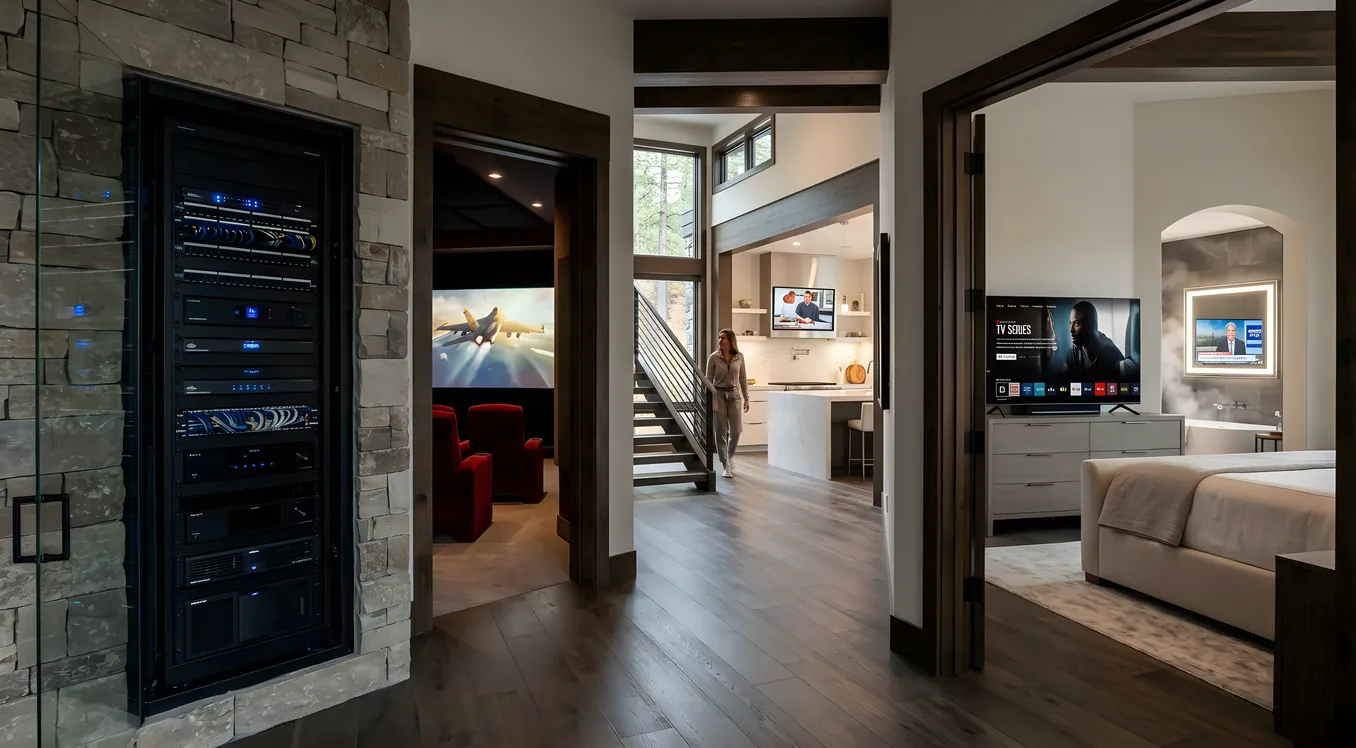
A home theater is a dedicated room. Whole-home AV distribution is a different problem: you have a cable box, a streaming device, a Blu-ray player, and a media server sitting in a rack somewhere, and you want any of them available on any television in the house. The master bedroom, the kitchen, the covered patio, the kids’ playroom. One source, many destinations, all of it working at the same time.
Getting there is not simply running HDMI cables everywhere. The technology choices, the infrastructure decisions, and the control strategy all vary depending on how many sources you have, how many displays you’re serving, and what you expect the experience to look like in each room.
What AV Distribution Actually Means
At its simplest, AV distribution means centralizing your source equipment in one location and routing signals to displays throughout the house. Instead of a cable box behind every television, you have one cable box (or a few) in a rack, and those signals travel through the walls to each TV.
The central equipment location is typically a utility closet, a basement rack, or a dedicated AV closet near a mechanical room. From that location, the system routes audio and video signals to displays, speakers, and in-wall controls at each destination. A wiring guide covers what to run during construction or renovation, but the short answer is that the infrastructure choices you make early determine what’s possible later.
The benefits extend beyond convenience. Centralizing sources means fewer devices accumulating dust and heat behind individual televisions. Maintenance happens in one place. When a streaming service updates its app and breaks something, you fix it once rather than chasing it through eight rooms.
HDMI Matrix Switching
The most straightforward distribution approach is an HDMI matrix switch. A matrix switch accepts multiple HDMI inputs and routes any input to any output simultaneously. A 4x4 matrix, for example, handles four source devices and four display destinations. If five people in different rooms want to watch the same channel, all five outputs can carry that signal at once.
HDMI matrix switchers scale from modest 4x4 units to large 16x16 (and larger) configurations for commercial-grade installations. For residential use, 4x4 through 8x8 covers most households.
The limitation is distance. HDMI cable runs at high bandwidth struggle beyond roughly 50 feet without signal assistance. For a centralized rack in a basement or utility closet, direct HDMI runs to most rooms in the house will fall outside that range. You can extend with active HDMI cables, fiber optic HDMI, or HDMI extender kits, but at that point you’re essentially reinventing what the next tier of technology already solves natively.
HDMI matrix is still the right answer for smaller installations where source and destination equipment are physically close, or where all displays are within reasonable cable distance of the rack. Cost tends to be lower than the alternatives for these simpler setups.
HDBaseT: The Residential Standard
HDBaseT has become the practical standard for residential whole-home distribution. It carries 4K video, audio, control signals, and in some implementations power over a single Cat6 cable to distances up to 330 feet. That range is enough to reach any room in most homes from a centralized rack location.
The technology uses the same structured cabling infrastructure that carries data network signals. If a home already has a Cat6 home-run wiring setup (all cables running back to a central distribution point rather than daisy-chaining between rooms), much of the cabling infrastructure is already compatible.
An HDBaseT distribution system consists of a transmitter at the source end and a receiver at each display. The transmitter converts the HDMI signal to HDBaseT for the cable run, and the receiver converts it back to HDMI at the television. When combined with an HDMI matrix switch, you can route any source to any HDBaseT-connected display from the central rack.
A common residential configuration pairs an 8x8 HDMI matrix with HDBaseT transmitters on each output and HDBaseT receivers at each display location. Source selection happens at the rack or through a control system, and the signal travels cleanly over Cat6 to wherever it’s needed.
One practical advantage: because HDBaseT runs over standard structured cabling, a new home or a renovation that pre-wires Cat6 home runs throughout the house can accommodate HDBaseT distribution without specialized cable. Wiring your home for Cat6a (rather than Cat6) provides additional headroom, which matters for the technology discussed in the next section.
AV over IP: Network-Based Distribution
AV over IP takes a different approach. Rather than dedicated point-to-point runs from a matrix switcher, AV over IP encodes each source signal into a data stream and transmits it over a standard Ethernet network. Receivers at each display decode the stream and output to the television.
The network infrastructure carries the traffic. A properly configured 1Gbps managed switch handles multiple 4K streams simultaneously. Higher-bandwidth implementations use 10Gbps switching infrastructure for uncompressed or minimally compressed 4K video.
The scalability is the appeal. A matrix switch has a fixed input/output count. Adding the ninth source to an 8x8 matrix means replacing the matrix. In an AV over IP system, adding a source means connecting another encoder to the network. Adding a destination means connecting another decoder. Theoretical limits are far beyond what any residential installation would approach.
The tradeoff is cost per endpoint. Each source needs an encoder, and each display needs a decoder, with pricing at the quality level suitable for residential AV running $500 to $1,500 per endpoint or more. For smaller installations, the per-endpoint economics favor HDBaseT over AV over IP. As system size grows past ten or twelve endpoints, AV over IP often becomes more cost-effective overall despite the higher per-unit cost, because the network switching infrastructure is shared and scales less steeply than dedicated matrix switching.
AV over IP also simplifies the distribution of content from network-attached sources: streaming services running on dedicated devices, media servers, or NAS-attached media libraries all speak the same network language as the distribution system.
Audio Distribution Alongside Video
Video distribution handles the picture. Audio requires its own consideration, and there are several ways to approach it depending on how the system is structured.
For rooms where a television is the primary display, audio can follow the video signal. HDBaseT carries audio alongside video, so the receiver outputs audio to the television’s speakers, or to an AV receiver or soundbar connected to the display. This works well for secondary TVs in bedrooms, kitchens, and casual-viewing spaces where the audio expectation is reasonable sound rather than a high-performance system.
For distributed background audio separate from video (music throughout the house, independent of what any particular television is showing), a dedicated whole-house audio system provides more flexibility. Multi-zone audio amplifiers, such as those from Sonance, Anthem, or similar manufacturers, accept source inputs and distribute audio to individual speaker zones throughout the house. Each zone has independent volume control, source selection, and scheduling. A matrix audio system can route different music sources to different areas simultaneously.
The most capable installations integrate video distribution and audio distribution into a unified control system rather than running them as separate, uncoordinated layers. Source selection in one system triggers the appropriate changes in the other, managed by the control platform.
Control Integration
The technical capability to route video and audio to any room is only useful if controlling it is straightforward. This is where automation platforms like Control4, Crestron, and Savant bring significant value to whole-home distribution systems.
Each room in a distributed system needs local control: the ability to select a source, adjust volume, and manage whatever is happening in that space without affecting other rooms. In practice, this means in-wall keypads at each display location. A four-button keypad in a kitchen might have buttons for Cable TV, Streaming, Music, and Off. Pressing Cable TV routes the appropriate source from the central rack to the kitchen display and adjusts the zone audio accordingly. No navigation through menus, no hunting for a remote.
Control4, Crestron, and Savant all offer in-wall keypads designed for this application. The keypad communicates with the control processor, which sends the appropriate commands to the matrix switch (or AV over IP system), the HDMI transmitters, and the audio distribution system simultaneously.
The control system also handles feedback. Because matrix switches and AV over IP systems can communicate their current state, the control processor knows what source is active in each room and can display that information on keypads or touchscreens. If someone changes source selection at the television using a handheld remote, the control system can detect the change and update the interface accordingly.
For homes already running Control4 or a similar platform for lighting and climate, adding AV distribution to the same control ecosystem means a single interface manages the entire house. The “Watch Movie” scene that dims the lights in the main theater can simultaneously prepare the appropriate source for any secondary displays that should be active.
A Typical Residential Setup
Most residential whole-home AV distribution projects center on four to six source devices: a cable or satellite receiver, one or two streaming devices, a Blu-ray player, a gaming console, and sometimes a media server. Displays range from four to eight, distributed across the primary living room, master bedroom, kitchen, secondary bedrooms, outdoor spaces, and wherever else TVs live.
The source equipment centralizes in a rack, typically in a basement, utility closet, or AV room. The rack holds the HDMI matrix or AV over IP switching equipment, the audio distribution amplifiers, the control system processor, and ancillary equipment including network switches, power conditioning, and UPS backup.
Structured cabling (Cat6 or Cat6a home runs) connects the rack to each display location. At each display, the cable terminates at a wall plate where the HDBaseT receiver or AV over IP decoder connects. The television or display connects to the receiver via a short HDMI run. A keypad mounts nearby for local control.
The control system ties everything together. Source selection at any keypad routes the correct signal from the rack to that display. Volume control adjusts the audio for that zone. Power management turns off displays and mutes audio when rooms are unoccupied.
Future-Proofing the Infrastructure
The technology in whole-home AV distribution moves. The infrastructure does not, or at least it should not. Running structured cabling, particularly Cat6a throughout the house, is a one-time opportunity that pays dividends across technology generations.
Cat6a supports both HDBaseT today and AV over IP tomorrow. If a system starts with HDBaseT for budget reasons and the homeowner later wants to scale to AV over IP, the cabling infrastructure is already there. Adding encoders and decoders at each end of existing Cat6a runs is far less disruptive than re-wiring.
The same logic applies to conduit. Pulling Cat6a through conduit during construction or a major renovation allows future cable replacement without opening walls. The investment is modest relative to the cost of the overall project and the cost of drywall repair later.
Video connectivity standards also evolve. HDMI 2.1 supports 8K and higher frame rates at 4K. AV over IP systems at the higher end of the market already support these specifications. Buying into infrastructure and switching equipment that’s at the current specification rather than a generation behind gives the system more runway before an upgrade cycle becomes necessary.
What It Costs
Whole-home AV distribution pricing depends on the number of sources, the number of display destinations, the technology approach, and the control integration involved.
A basic 4x4 HDBaseT system, four sources to four displays, with simple source selection and no automation platform integration, typically runs $3,000 to $6,000 installed. This covers the matrix switcher, four HDBaseT receiver units, basic keypads or IR blasters for source selection, and installation labor.
Moving to an 8x8 HDBaseT system with a proper automation platform (Control4, Crestron, or Savant), in-wall keypads at each display location, and integration with the home’s audio distribution system runs $8,000 to $15,000 installed. The cost increase reflects both the additional hardware and the programming labor required to configure the control system for per-room source selection and scene management.
AV over IP systems at the residential quality level, covering six to twelve display destinations with full control integration, typically run $15,000 to $30,000 or more installed. The per-endpoint hardware cost, the managed network switching required to carry the streams reliably, and the control system programming all contribute. Very large installations, twenty or more display destinations in estate-scale homes, can exceed these figures substantially.
Choosing the Right Approach
For most households with four to eight displays and four to six source devices, HDBaseT with a quality HDMI matrix and a control platform delivers the best combination of performance, reliability, and cost. The technology is mature, installers are familiar with it, and Cat6a infrastructure supports future expansion.
AV over IP makes sense for larger properties, for projects where scalability is a genuine long-term concern, or for new construction where the network infrastructure investment can be spread across multiple systems (networking, security cameras, and AV distribution sharing the same switching fabric).
Either way, the infrastructure decisions made during construction or renovation are the ones that last. The source equipment and switching hardware will cycle through upgrades. The cable in the walls stays.