Ambient Light Management: Blackout, Bias Lighting, and Screen Choice
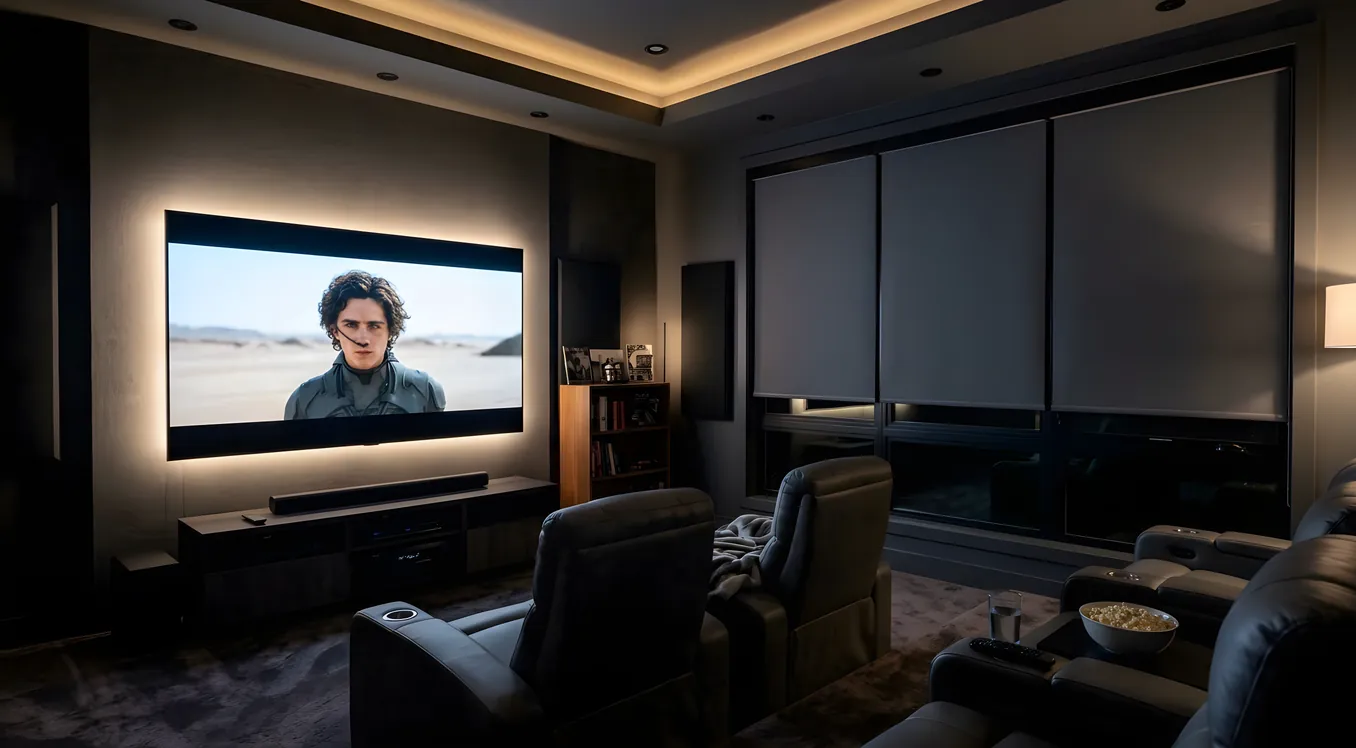
Light is the single variable that most home theater owners underestimate at the planning stage and then fight for years after installation. A display rated for 1,000,000:1 contrast performs at roughly 100:1 in a room with uncurtained windows. The physics are straightforward: your screen reflects room light. Every lumen bouncing off the ceiling lands on the display surface, raising the black floor and washing out shadow detail. Managing that light before it reaches the screen is not an optional refinement. It determines whether the system actually performs.
Why Ambient Light Destroys Contrast
A projector screen or television panel produces black by blocking or absorbing light from its own source. A projector’s black level is the minimum amount of light it projects onto the screen. An OLED television’s black level approaches zero because it simply turns pixels off. In both cases, what the viewer perceives as black is heavily influenced by how much external light the screen is reflecting.
The contrast ratio in any real-world condition is calculated by dividing the white luminance by the black luminance, where black luminance includes both the display’s native floor and the reflected ambient contribution. If a 120-inch projection screen in a bright room reflects 5 foot-lamberts of ceiling light, and the projector’s white output at that screen size is 16 foot-lamberts, the real-world contrast ratio is roughly 3:1 regardless of what the projector’s spec sheet claims. The same projector in a fully darkened room where ambient reflection drops to 0.05 foot-lamberts delivers a contrast ratio above 300:1.
This is why dedicated home theater rooms are built with dark walls, dark ceilings, and zero window penetration. Every surface that can reflect ambient light back toward the screen degrades the image.
Blackout: The Foundation of Light Control
No screen technology substitutes for eliminating light at the source. The hierarchy of light control strategies, from most to least effective:
Blackout curtains and shades are the baseline intervention for any room with windows. Cellular blackout shades mounted inside the window frame, combined with blackout curtains mounted to the wall on either side of the window frame (to prevent light bleed around the edges), eliminate virtually all daylight penetration. Budget around $150 to $400 per window for a quality installation. Roller blackout shades from Chicology, Keego, or similar manufacturers are adequate for most rooms.
Light traps for doorways solve the gap problem. A home theater room with a proper blackout shade on every window can still suffer from significant light intrusion if the entry door is at the end of a lit hallway. A light trap is a short corridor extension or vestibule built into the doorway, with the two doors offset so neither can be open simultaneously with a clear line of sight into the room. For rooms without the space for a full light trap, a heavy curtain on a ceiling-mounted track across the entry can reduce hallway light spillage by 90% or more.
Wall and ceiling treatment matters more than most homeowners expect. A white or light gray ceiling in a home theater room acts as a secondary screen, bouncing light from the projector or windows back toward the display surface. Painting ceilings and walls in flat-finish dark colors (charcoal, dark gray, near-black) can measurably reduce screen-reflected ambient by 30% to 50% in rooms where total light elimination is not possible. The blackout solutions guide covers material choices and installation approaches in detail.
Bias Lighting: The Counterintuitive Add
Bias lighting is the practice of placing a low-brightness light source behind the display, illuminating the wall immediately surrounding it. The effect seems to contradict the goal of light control, but the mechanism is different from room ambient: bias lighting is controlled, color-calibrated, and positioned so that it illuminates the surround area without directly illuminating the screen surface.
The perceptual benefit is real. The human visual system judges brightness relationally, not absolutely. A black level that appears as a deep, credible black in a fully dark room will appear as a muddy gray if the viewer’s eye is adapted to the bright ambient of an untreated room. Bias lighting provides a reference level between the peak brightness of the display and the absolute black of an unlit room, reducing the adaptation gap. Eye strain over multi-hour sessions also decreases because the eye is not repeatedly cycling between a very bright display and a very dark surround.
The Imaging Science Foundation{rel=“noopener nofollow”} recommends a bias light color temperature of 6500K (D65), the same white point used in professional video mastering and in the sRGB and BT.709 display standards. Using a bias light that deviates significantly from 6500K skews the viewer’s chromatic adaptation and can cause the display to appear too warm or too cool even when it is calibrated correctly.
Two products worth naming in this category are Luminoodle (a bias lighting strip system available in various lengths) and MediaLight, which markets specifically to home theater calibrators and offers D65-accurate LED strips measured and validated against the mastering standard. For large displays (75 inches and above) and projection screens, the Mk2 MediaLight in its 6500K variant is the product that professional calibrators most commonly recommend.
Practical installation: mount the LED strip on the back surface of the television or projection screen frame, or on a shelf or mount behind a projector screen, at approximately 10% to 15% of the screen’s peak white luminance. Most bias lighting controllers allow brightness adjustment; set it to the point where the wall behind the screen glows softly but does not produce visible direct light from any seating position.
Screen Selection by Room Light Level
Screen gain and technology interact directly with room light conditions. Choosing the wrong screen for the ambient environment wastes money in either direction: a high-gain screen in a dedicated dark room narrows the sweet spot without meaningful benefit, and a 1.0-gain screen in a living room with afternoon sun creates a washed-out image regardless of projector brightness.
1.0 gain screens are the reference choice for fully darkened dedicated theater rooms. They reflect light equally in all directions, which means they do not restrict the off-axis viewing angle and do not create hot-spotting at the center of the image. Any viewer in the room sees the same image. Most high-performance screen fabrics (Stewart Filmscreen Studiotek 100, Screen Innovations Zero Edge) target 1.0 gain precisely because the ISF and calibration community treat it as neutral.
Ambient Light Rejecting (ALR) screens are engineered for rooms with uncontrolled overhead or ambient light. ALR fabrics use a lenticular or microstructure surface to reflect projector light (arriving at a low angle from the front or ceiling mount) toward the viewer while absorbing overhead light (arriving at a steep angle from ceiling fixtures or windows). The ALR screen guide covers the optical mechanism in more detail, but the practical result is that an ALR screen can maintain a usable image in a room that would render a standard white screen unwatchable. The tradeoff is reduced off-axis performance: ALR screens typically have a half-gain viewing angle of 60 to 80 degrees, narrower than the near-180-degree performance of a 1.0-gain fabric.
Gray screens occupy the middle position. A gray screen (gain around 0.8 to 0.9) absorbs a percentage of both the projector’s white output and the reflected ambient. In rooms with moderate, controlled ambient (drapes drawn, no direct sunlight), gray screens can improve perceived contrast by lowering the effective black floor without the optical complexity of full ALR construction. The tradeoff is reduced peak brightness; a projector that produces 1,800 lumens at a 1.0-gain screen produces roughly 1,440 effective lumens at a 0.8-gain gray screen.
Projector Brightness Requirements by Room Condition
Projector lumen specifications are measured in calibrated modes with color and gamma optimized, not in dynamic/bright modes. The number you’ll see most often in calibrated reviews is the “cinema” or “reference” mode output, which typically runs 40% to 60% of the box spec. When planning for a specific room condition, target calibrated lumens:
| Room Condition | Calibrated Lumens Needed |
|---|---|
| Fully dark, blackout shades, dark surfaces | 1,500 |
| Controlled ambient (drapes, dim fixtures) | 2,500 |
| Some ambient light, windows present | 3,500 or more |
These figures assume a 120-inch diagonal screen at 1.0 gain. Larger screens require proportionally more lumens; a 150-inch screen needs roughly 56% more light than a 120-inch to achieve the same foot-lambert level. A higher-gain screen reduces the lumen requirement proportionally, with the off-axis caveats noted above.
The relationship between room condition and projector selection is direct: buying a 1,500-calibrated-lumen projector for a room you cannot fully darken is a decision you will regret. The projector is not underpowered in an absolute sense; it is underpowered relative to the ambient load in the room.
Ultra-Short Throw Projectors and ALR in Living Rooms
Ultra-short throw (UST) projectors represent the most viable projector solution for living rooms that cannot be darkened. A UST unit sits 6 to 12 inches from the screen, projecting upward at a steep angle. Overhead ambient light arrives at a completely different angle than the projector light, which means an ALR screen engineered for UST geometry can selectively reject that overhead light while accepting the steeply angled projector beam.
The combination of a UST projector with a UST-optimized ALR screen (such as the Elite Screens Aeon CLR3 or the Samsung-partnered ALR screens designed for the Frame and UST lineup) can produce a watchable image in rooms where a standard throw projector on a 1.0-gain screen would wash out entirely. UST projectors from Hisense (the PX2-Pro), LG (the HU915QE), and Epson (the LS800) deliver between 2,500 and 4,000 lumens, which combined with ALR rejection ratios of 85% to 95% for overhead light creates a system that handles typical living room conditions.
The limitation is still physics. A UST plus ALR combination handles overhead artificial light and moderate daylight well. It does not handle direct sun hitting the screen or windows immediately adjacent to the screen without additional window treatment. Read the lighting design guide for planning room layouts that work with UST geometry.
LED vs. OLED in Bright Room Conditions
For flat-panel television buyers, the choice between LED and OLED carries different implications depending on room light control.
OLED panels produce perfect black levels and exceptional contrast in dark rooms because each pixel generates its own light and can be turned fully off. In a bright living room, however, OLED’s peak brightness ceiling (typically 1,000 to 1,500 nits on a full white field, lower on larger screen portions) limits how well it fights ambient light. The screen surface also has a semi-glossy finish that reflects room light directly. OLED in a bright room produces excellent colors and contrast in shadow areas but can look washed out in bright scenes compared to a high-brightness LED panel.
LED (specifically mini-LED and full-array local-dimming LED) panels can achieve 2,000 to 4,000 nits peak brightness, which gives them a meaningful advantage in ambient-light environments. A mini-LED panel at 2,500 nits in a room with 200 lux of ambient illumination will maintain visible contrast on bright content where an OLED panel at 800 nits on the same content would look noticeably compressed. The tradeoff is black level: even well-implemented local dimming produces some halo artifact around bright objects on dark backgrounds, which OLED eliminates entirely.
The practical guidance: for dedicated dark rooms or rooms with strong light control, OLED is the superior flat-panel choice. For living rooms, sunrooms, or spaces where blackout is not achievable, high-brightness mini-LED panels are the more pragmatic option. The display technology choice, like almost every other home theater variable, resolves back to the same question: how much can you control the light in the room?
Getting the Sequence Right
The order in which you address ambient light management matters as much as the individual decisions. Light control comes first, screen selection second, display selection third. Building a room around a display without solving the light problem first is the most common and most expensive mistake in home theater planning.
A fully darkened room with a modestly priced projector and a 1.0-gain screen will outperform an expensive display in an untreated room. Bias lighting at 6500K costs under $100 for most setups and measurably improves perceived contrast. These are the foundational decisions; everything else is refinement on top of them.