Screen Size vs Viewing Distance: THX and SMPTE Guidelines
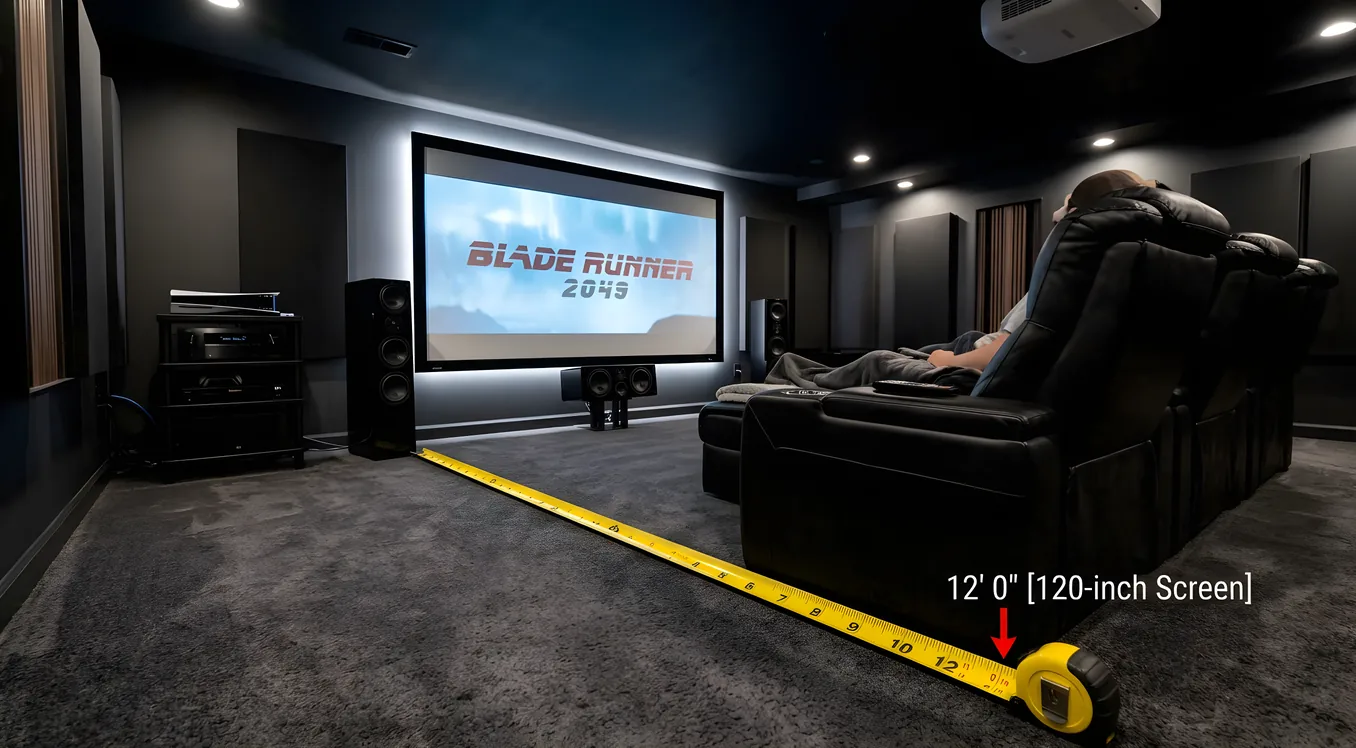
Most home theater rooms are set up with the seating too far back. It’s the single most common mistake in dedicated theater design, and it happens for understandable reasons: people are used to living room viewing distances, and sitting closer to a large screen feels unusual until you do it for a week. The research behind professional standards tells a different story. THX, SMPTE, and IMAX have each published recommendations for how large a screen should occupy your field of vision, and every one of them puts the ideal viewing position significantly closer than most homeowners expect.
Understanding where those numbers come from, and how to apply them to your specific room and screen size, is the difference between a theater that feels like a real cinema and one that feels like an expensive living room.
The Three Standards: THX, SMPTE, and IMAX
Three organizations have published formal viewing angle standards, and they’re not in complete agreement. That’s by design: they’re solving for different contexts.
THX recommends a viewing angle of 36 degrees. This means the screen should occupy 36 degrees of your horizontal field of vision from the primary seating position. THX developed its standards for certified commercial cinema evaluation environments, and the 36-degree recommendation represents a minimum threshold for cinematic immersion. Screens that fill less of your field of vision than this tend to feel like a framed picture you’re observing rather than an environment you’re inside. At 36 degrees, the screen commands your peripheral vision enough that your brain registers it as the dominant sensory input in the room. THX also describes this as the screen filling roughly 40% of your total field of vision, which accounts for the wider peripheral range beyond the focused 36-degree arc.
SMPTE (Society of Motion Picture and Television Engineers) sets its standard at 30 degrees. SMPTE’s guidelines were developed for mastering and screening rooms where engineers need consistent reference conditions across different facilities. The 30-degree standard is slightly more conservative than THX because the priority in a mastering context is repeatability and freedom from distraction, not maximum immersion. For home theater purposes, the SMPTE standard works well as a floor: any viewing position producing less than 30 degrees of screen coverage is giving up meaningful image engagement.
IMAX commercial theaters target a 58-degree viewing angle. This is the reference point for what “immersive” actually means at the extreme end, and it explains why the front third of an IMAX auditorium produces an experience that’s qualitatively different from anything else in commercial exhibition. At 58 degrees, the screen extends into peripheral vision far enough that your visual system processes it differently. For home theater rooms, 58 degrees is a useful north star even if it’s rarely achievable without a very large screen in a relatively compact space.
The practical takeaway: design your primary seating for 36-40 degrees. That’s the THX range, it’s genuinely immersive, and it’s achievable in most dedicated theater rooms without requiring an unusually large screen or an unusually shallow room depth.
Calculating Screen Angle from Screen Size and Distance
The formula converts a known screen size and seating distance into a viewing angle, which you can then compare against the standards above.
Start with screen width (not diagonal). For a 16:9 aspect ratio screen, multiply the diagonal by 0.872 to get the width. For a 2.35:1 CinemaScope screen, multiply the diagonal by 0.921.
Formula: 2 × arctan(screen width ÷ (2 × viewing distance))
Both measurements need to be in the same unit (inches or feet). The result is the horizontal viewing angle in degrees.
Worked example: 120-inch diagonal 16:9 screen at 12 feet.
- Screen width: 120 × 0.872 = 104.6 inches (8.7 feet)
2 × arctan(8.7 ÷ (2 × 12))=2 × arctan(0.3625)=2 × 19.9°= 39.8 degrees
That’s solidly in the THX zone.
Alternatively, you can work backward from a target angle to find the ideal distance:
Ideal distance = screen width ÷ (2 × tan(target angle ÷ 2))
For a 36-degree THX target and the same 120-inch screen:
8.7 ÷ (2 × tan(18°)) = 8.7 ÷ 0.649 = 13.4 feet
Distance Table: Common Screen Sizes with THX and SMPTE Ranges
The table below gives recommended viewing distance ranges for common screen sizes on a 16:9 screen. The “THX zone” column targets 33-40 degrees (practical immersion range). The “SMPTE minimum” column is the furthest distance you’d want to push.
| Screen Size (diagonal) | Screen Width | SMPTE Min Distance (30°) | THX Zone (36°) | Close Limit (40°) |
|---|---|---|---|---|
| 75” | 65.4” (5.5’) | 11.1 ft | 8.5 ft | 7.4 ft |
| 85” | 74.1” (6.2’) | 12.6 ft | 9.6 ft | 8.4 ft |
| 100” | 87.2” (7.3’) | 14.8 ft | 11.3 ft | 9.8 ft |
| 110” | 95.9” (8.0’) | 16.3 ft | 12.4 ft | 10.8 ft |
| 120” | 104.6” (8.7’) | 17.8 ft | 13.6 ft | 11.8 ft |
| 133” | 115.9” (9.7’) | 19.7 ft | 15.1 ft | 13.1 ft |
| 150” | 130.8” (10.9’) | 22.2 ft | 17.0 ft | 14.8 ft |
Most home theater rooms land in the 12-16 foot range for primary seating. That makes 110-133-inch screens the practical sweet spot for hitting THX angles in typical room depths, which is why projection screens in that diagonal range dominate dedicated theater installations.
Resolution and Viewing Distance: When 4K Detail Becomes Visible
The other variable that changes with viewing distance is pixel visibility. Human visual acuity limits how fine a detail the eye can resolve at a given distance, and that limit determines whether 4K resolution actually looks different from 1080p at your specific seat.
The standard threshold uses 1 arc-minute of visual angle, roughly 0.0167 degrees, as the limit of resolvable detail for normal vision. At that acuity, 4K resolution (3840 × 2160 pixels) requires the following maximum viewing distance to show any visible advantage over 1080p:
Max distance for 4K benefit = screen height ÷ (2 × tan(0.5 arc-minutes)) × (1/1080)
Simplified for practical use: you need to sit within roughly 1.5 times the screen’s diagonal to see a meaningful 4K advantage over 1080p. Beyond that distance, the pixel density of 4K exceeds the resolving capability of the human eye under normal viewing conditions, and the two formats look identical.
For a 120-inch screen, the 4K threshold is approximately 180 inches, or 15 feet. Coincidentally, that’s squarely in the THX-recommended range for that screen size. This alignment is one of the underappreciated arguments for closer seating: when you sit at THX-correct distances, you’re also sitting close enough to actually benefit from 4K content. The viewer who plants themselves 20 feet back in a 12-foot room is neither getting cinematic immersion nor extracting any value from their 4K source.
HDR and high frame rate content show advantages at greater distances than pixel resolution does, so 4K delivery is still worthwhile even beyond the pixel-visibility threshold. But the resolution argument specifically is strongest at closer viewing positions.
Why Most People Sit Too Far Away
The pull toward greater viewing distance in home settings is partly psychological and partly architectural. Televisions spent decades in living rooms sized for the 4-6 foot screen diagonals that were common before flat panels and streaming pushed sizes upward. Seating arrangements solidified around those historical screen sizes, and rooms were organized to accommodate furniture rather than viewing geometry.
There’s also a comfort adjustment period. Sitting 12 feet from a 120-inch screen for the first time feels uncomfortably close to someone accustomed to 18 feet. After a week of watching at the shorter distance, the larger field of vision becomes the new normal and the old position feels oddly detached. The discomfort is real but it’s temporary; the engagement benefit is permanent.
In dedicated theater rooms, the argument for closer seating is straightforward: the room serves one purpose, and that purpose is optimized at THX-range viewing distances. The projector vs TV decision often hinges on this, because a projector’s ability to produce very large images at lower cost per inch of diagonal makes it far easier to achieve proper viewing angles in a room of any given depth.
CinemaScope (2.35:1) vs 16:9: How Aspect Ratio Changes the Math
Standard consumer screens are 16:9 (1.78:1 aspect ratio). Theatrical films shot in CinemaScope or anamorphic formats use a 2.35:1 or 2.39:1 aspect ratio, which is substantially wider relative to its height. This changes the viewing angle calculations.
For a given screen diagonal, a 2.35:1 screen has a wider image than a 16:9 screen of the same diagonal. That means a 120-inch 2.35:1 screen (screen width 110.5 inches) fills more horizontal field of vision than a 120-inch 16:9 screen (screen width 104.6 inches) at the same distance. The difference is about 5%, which at typical viewing distances adds roughly 1.5-2 degrees to the horizontal viewing angle.
The practical implication cuts two ways. If you’re installing a dedicated 2.35:1 screen for a Scope-format cinema room, you can achieve THX viewing angles from slightly greater distances than the table above suggests, which gives you a bit more flexibility in room layout. On the other hand, the top and bottom of a 16:9 image projected onto a 2.35:1 screen (with constant-width masking) will appear smaller than the widescreen content, and viewers sitting at distances calibrated for the wide image may find 16:9 content slightly cramped vertically.
Rooms designed around 2.35:1 screens often use anamorphic lens attachments or zoom memory on the projector to manage the transition between aspect ratios without repositioning. This is a system-level decision that should inform the screen selection from the start. The projection screens guide covers masking systems and constant-width versus constant-height configurations in detail.
Balancing Ideal Distance with Real Room Constraints
Theoretical ideals are useful until they collide with the room you actually have. Most home theater installations involve at least one constraint: fixed room depth, existing seating that won’t move, a doorway or HVAC duct that limits screen placement, or WAF considerations that push the screen further from the primary seat than the math would prefer.
The practical approach is to determine the maximum screen size that achieves at least 30 degrees (SMPTE minimum) from your fixed seating position, then ask whether the room can accommodate a screen large enough to reach the THX zone. Room depth is often the binding constraint; if you can’t move the seating closer, the only lever is a larger screen.
A 14-foot room with fixed seating at 12 feet needs a screen producing at least a 30-degree angle at that distance. From the table, a 100-inch screen reaches the SMPTE minimum at about 14.8 feet, so a 100-inch screen at 12 feet actually exceeds the THX target (producing about 40 degrees). In this scenario, a 100-inch screen at 12 feet is closer to ideal than a 120-inch screen would be, because the larger screen would push you past 40 degrees and into a range where neck movement becomes necessary to scan the image.
The upper comfortable limit is generally around 40-45 degrees, beyond which the screen is so wide that viewers need to move their eyes significantly to track across the full width of the image. Commercial IMAX achieves 58 degrees partly through auditorium geometry that places most seats at a height where the screen fills the upper visual field rather than requiring lateral scanning. In a flat-floor home theater, maintaining 36-40 degrees keeps the entire image in a comfortable fixed-head viewing position.
The room dimensions guide addresses how to balance screen placement, projector throw distance, seating rows, and acoustic treatment positions within rooms that don’t have infinite flexibility.
Getting the Numbers Right Before You Commit
Viewing distance isn’t a detail to work out after the screen is on the wall. It shapes every other decision in a theater build: screen size, projector throw ratio, seating depth, room length, and whether a single row of seats or multiple tiered rows even fit within the THX viewing zone.
Run the angle calculation for your room before selecting a screen size. Determine whether the distances that produce 30-40 degree angles are compatible with your actual room depth. If they are, you have room to optimize. If the numbers show a conflict, adjusting screen size up or seating position forward usually produces more benefit than the same budget spent on projector brightness or speaker placement.
The cinema experience that makes dedicated home theaters worth building isn’t the hardware alone. It’s the experience of a screen that genuinely fills your vision, at a distance calibrated to how human eyes actually work.