Projector vs Large TV: How to Choose for Your Home Theater
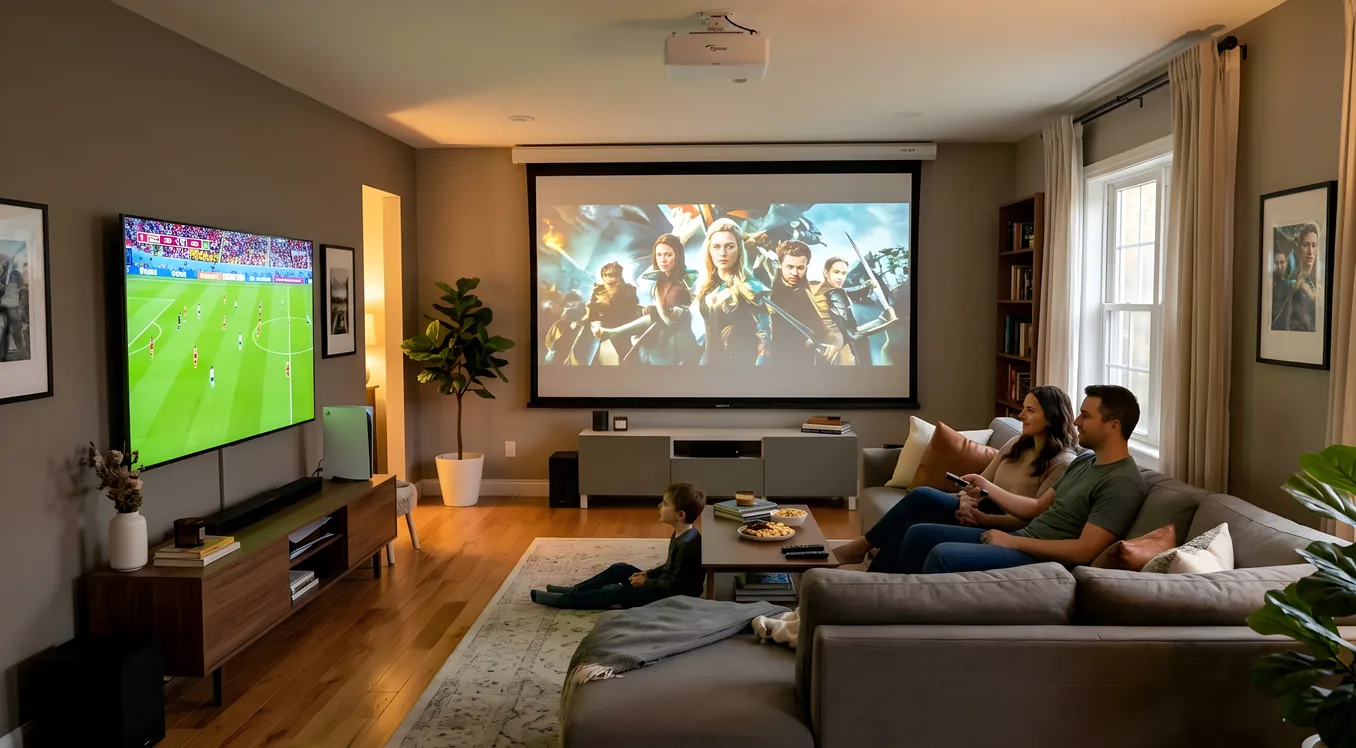
The question sounds simple: projector or TV? In practice, it splits into a dozen smaller questions about room conditions, viewing habits, budget, and how often you are willing to manage a setup before and after each use. This guide covers every material difference between the two technologies so you can make a decision that holds up five years from now.
The Size Equation
Screen size is where projectors have no competition. The largest consumer televisions available today stop at 98 inches, with 85-inch models representing the practical ceiling for most households before prices climb steeply. A projector starts at roughly 100 inches and scales to 200 inches or beyond, constrained only by throw distance and room size.
This size advantage is not purely about spectacle. At a standard seating distance of 12 to 14 feet, an 85-inch TV fills a significant portion of your field of view, but a 120-inch projected image crosses a perceptual threshold where peripheral vision engages and the sense of cinematic immersion becomes qualitatively different. Movies shot in anamorphic widescreen (2.39:1 aspect ratio) in particular benefit from this scale in ways that no flat panel can replicate at any practical price point.
The size advantage comes with a constraint: you cannot simply put a projector wherever you want. Throw ratio determines how far back the projector must sit to fill a given screen size. A standard long-throw projector needs 10 to 14 feet of throw distance for a 100-inch image. This is workable in most living rooms with ceiling mounts, but it is a real installation consideration that televisions simply do not impose.
Image Quality: Where Each Technology Wins
Televisions, particularly OLED panels, hold a significant and genuine advantage in several image quality categories. Native contrast on a top-tier OLED panel reaches infinity ratios because individual pixels turn off completely in dark scenes. HDR peak brightness on high-end OLED and Mini-LED sets exceeds 1,000 to 2,000 nits. Color volume is excellent and consistent regardless of room light. You can compare the underlying display technologies in more detail in the OLED vs LED vs Mini-LED breakdown.
Projectors occupy a different position on this tradeoff curve. Native contrast on even the best consumer projectors (JVC’s D-ILA units, for instance) runs around 40,000:1 with a dynamic iris, compared to the pixel-level control of OLED. HDR rendering on a projected image is a compromise: the projector’s output in lumens limits how brightly it can render specular highlights, so tone-mapping becomes more aggressive. A real HDR flare, the kind that a 1,500-nit OLED renders at eye-watering brightness, becomes a bright-but-not-searing region on a projected image.
Where projectors recover ground is in the overall cinematic character of the image. The combination of screen size, the reflective quality of a proper projection screen (rather than an emissive panel), and reduced eyestrain from watching a large reflected surface over multiple hours creates a viewing experience that many home theater enthusiasts strongly prefer for long movie sessions, independent of any measured specification.
Room Requirements
A television installs in virtually any room under virtually any lighting condition. You can watch an OLED panel with the afternoon sun coming through uncovered windows and still see a perfectly usable image, because OLED panels produce light aggressively enough to compete with most ambient sources.
Projectors require light control. A standard home theater projector rated at 2,000 lumens needs room darkening to produce a satisfying image on a 120-inch screen. Afternoon viewing with open blinds is not viable for most projector setups. Evening viewing with lights off or controlled to dim indirect sources is where projectors perform as intended.
The requirement for a dedicated theater versus a media room setup is one of the first questions this split forces. A living room that doubles as a social space during the day and a movie room at night needs either automated blackout shades or a high-lumen projector (typically 3,000+ lumens in a laser unit) to handle mixed-use conditions. A basement media room with no windows is the natural home for projector technology.
Ultra-short-throw (UST) projectors represent a partial exception to these room requirements, which leads to a separate discussion below.
Cost Per Inch of Screen
At 85 inches, a quality LED or OLED television costs between $2,000 and $4,000 depending on technology tier. At 65 inches, the range drops to $800 to $2,500. The price per inch of screen area is relatively linear in the TV category.
Projectors invert this relationship. The projector unit itself does not scale in price with screen size the way a TV does. A $2,500 laser projector throws the same 120-inch image as a $12,000 laser projector; the difference is in image quality, not size. Adding a quality fixed-frame screen at 120 inches runs $400 to $1,500 depending on gain and material. The total cost for a 120-inch projected image with a mid-tier laser projector and proper screen falls in the $2,500 to $5,000 range, which is cost-competitive with an 85-inch television at the upper price tier.
This math becomes more striking at larger sizes. A 150-inch television does not exist at any consumer price point. A 150-inch projected image with the same projector costs nothing extra beyond a larger screen.
The UST Projector Middle Ground
Ultra-short-throw projectors sit close to the screen (6 to 18 inches) and project large images without ceiling mounting, long throw distances, or image correction calculations. Units like the Hisense PX2-Pro and LG CineBeam Qube project 100 to 120-inch images from a cabinet placed directly below the screen, mimicking the footprint of a television installation.
UST projectors are not a replacement for traditional long-throw setups for reference-quality home theaters. The optics in UST lenses introduce a slight image structure at close viewing distances, and angular light rejection screen materials (required for UST to perform in ambient light) cost considerably more than standard gain screens. But UST projectors are a genuine option for living rooms where ceiling mounting is not possible and image size above 100 inches is a priority.
The right projectors guide covers UST, long-throw, and laser-vs-lamp technology tradeoffs in full detail.
Content Type and Viewing Habits
How you use a display affects which technology fits. Casual television watching, the kind where the TV is on as background audio-visual during dinner preparation or social gatherings, strongly favors a flat panel. You do not need to manage room light, the TV turns on instantly, and the always-on casual-use mode is entirely natural.
Dedicated movie viewing shifts the calculus. A two-hour film watched from a planned seating position, in a darkened room, with proper audio, is the environment projectors were designed for. The scale of the image and the character of the viewing experience over a 120-minute session match what commercial cinema achieves, even if specific technical measurements favor the television in some categories.
Sports and live event viewing tends to favor televisions. The brightness advantage matters in daytime viewing, and the fast-motion handling on modern OLED and Mini-LED panels is excellent. Projectors in the sub-$3,000 range can show motion artifacts on fast panning shots that a quality flat panel does not.
Gaming Performance
Gaming is one area where televisions hold a clear practical advantage for most users. Input lag on current OLED televisions, particularly LG’s C-series and the Sony A95K in game mode, measures below 2ms at 4K resolution. For competitive gaming, this matters. Projectors typically measure input lag in the 15 to 50ms range, with some gaming-specific models (BenQ’s X3100i, for instance) coming in below 17ms at 1080p, which is acceptable but not excellent by comparison.
Variable refresh rate support (VRR, G-Sync, FreeSync) is widespread on modern televisions at 120Hz and is appearing on projectors, but television implementations are more mature and better integrated with console firmware. HDR gaming, which depends on peak brightness to render specular highlights convincingly, also favors televisions with their higher nit output.
For single-player narrative games played at a more relaxed pace, the scale advantage of a projector creates its own immersive effect that some players strongly prefer. But for competitive multiplayer or console gaming where input responsiveness matters, a television is the better-engineered tool.
The screen size to viewing distance relationship is also relevant for gaming: at typical gaming distances of 6 to 8 feet, a 120-inch projected image may actually be too large for comfortable focus, while a 65 to 77-inch television at 8 feet sits in a good ergonomic range.
Lifespan and Maintenance
A flat panel television requires no maintenance during its operational life and typically lasts 7 to 10 years before brightness degradation or panel issues emerge. There are no consumables to replace.
Projectors divide on lifespan by light source type. Lamp projectors use high-pressure mercury lamps rated for 3,000 to 5,000 hours at full brightness. Replacement lamps cost $150 to $400 and are required every two to four years under regular use. Lamp brightness also decreases over time, so the calibrated image from year one looks noticeably different by year three.
Laser projectors change this calculation substantially. Laser light sources are rated for 20,000 hours, which at 10 hours of use per week represents roughly 40 years of theoretical life. In practice, other components will limit the projector’s service life before the laser does. Laser projectors cost more upfront, but the total cost of ownership over a decade compares favorably to lamp-based units when replacement lamp costs are factored in.
Dual-Display Setups
The projector vs. television question does not always require a single answer. Many home theater enthusiasts run both: a television in the living room for everyday use, sports, and casual viewing, and a projector in a dedicated space for film viewing. This setup is more common than it might seem because the use cases do not overlap as much as the question implies.
If your household splits between members who want a TV available during the day and a member who wants a proper projection setup for movie nights, a dual-display approach allocates the right tool to each use case without compromise. The cost is additive, but the combined experience of both technologies is genuinely superior to forcing a single device to cover conflicting requirements.
Decision Framework
The table below maps your situation to a recommendation:
| Your situation | Better choice |
|---|---|
| Living room, daytime use, no blackout control | Television |
| Dedicated dark room, screen size is the priority | Projector |
| Budget under $1,500 for display only | Television |
| Budget $2,500+, screen size matters more than peak brightness | Projector |
| Competitive gaming as primary use | Television |
| Cinematic film viewing, 2+ hours per session | Projector |
| No ceiling mount option, want 100”+ | UST projector |
| Mixed household with day and night use patterns | Both (dual-display) |
| OLED image quality a priority over size | Television |
The dominant factor in most real decisions is not technology preference but room conditions. If your room cannot support light control, buy the best television your budget allows. If you have a controllable room and screen size above 100 inches matters to you, a laser projector delivers an experience no flat panel can match at any price.