Best Home Theater Projectors: A Buyer's Framework
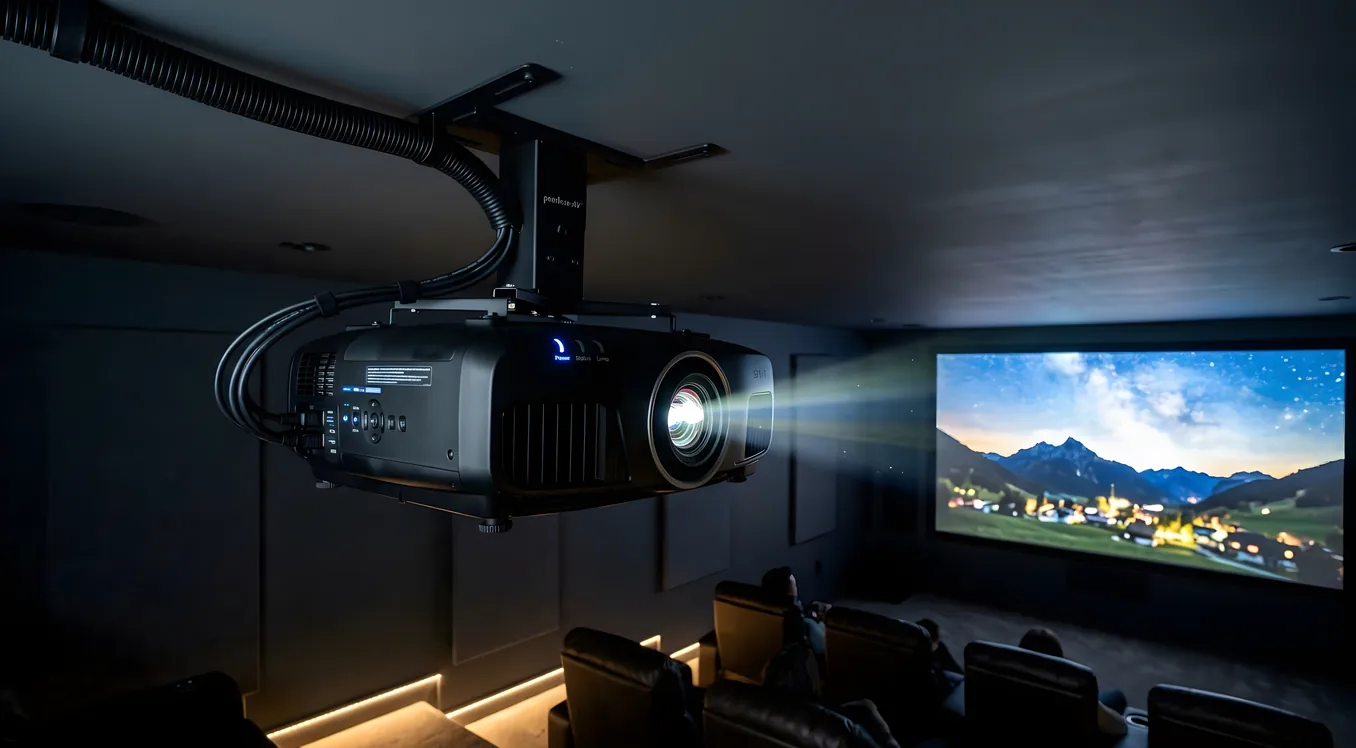
Choosing a home theater projector is not a product decision so much as a systems decision. The projector itself is only one variable. Room light control, screen gain, source equipment, and throw distance all interact with the projector’s specifications in ways that can make an $800 unit look mediocre in a well-designed room or a $5,000 unit look washed out in the wrong one. This guide focuses on the framework first, then maps specific models to that framework.
Display Technology: DLP, LCD, and LCoS
The three dominant projection technologies each make genuine tradeoffs, and knowing those tradeoffs is more useful than any ranking list.
DLP (Digital Light Processing) uses a chip covered in micro-mirrors, one per pixel. The mirrors tilt toward or away from the light source to produce dark or bright pixels. Single-chip DLP is the dominant technology in the $1,000 to $3,000 range. It produces excellent sharpness, high native contrast, and punchy highlights. The historical downside is “rainbow artifact,” a brief color separation visible to some viewers on bright objects against dark backgrounds. Three-chip DLP eliminates this entirely, but three-chip projectors are commercial-grade units at $20,000 and above.
LCD (Liquid Crystal Display) passes light through three liquid crystal panels, one per color channel (red, green, blue), then recombines them via a prism before projection. LCD projectors tend to produce high lumens per dollar and excellent color saturation out of the box. Their native contrast ratios are generally lower than DLP or LCoS because LCD panels cannot fully block light from the lamp. Epson dominates this space with its 3LCD technology, which is the same principle under a proprietary name.
LCoS (Liquid Crystal on Silicon) is the reflection-based cousin of LCD. Instead of transmitting light through the crystal, it reflects light off a silicon chip behind the crystal layer. Sony uses this under the name SXRD (Silicon X-tal Reflective Display); JVC calls it D-ILA (Direct Drive Image Light Amplifier). Both are proprietary refinements on the same core technology. LCoS delivers the highest native contrast ratios available in consumer projectors, which translates to deeper blacks and more convincing shadow detail. The tradeoff is cost: LCoS projectors start around $3,500 and dominate the high-end tiers.
Resolution: Native 4K vs. Pixel-Shifted 4K
Resolution labeling in projectors is less standardized than in televisions, and the difference matters for purchasing decisions.
Native 4K (3840 x 2160 pixels) means the imaging chip contains the full pixel count. Sony’s SXRD chips in the VPL-XW5000ES and VPL-XW7000ES are natively 4K. JVC’s D-ILA chips in the DLA-NZ7 and NZ8 are natively 4K. These projectors resolve every pixel of a 4K source without any processing compromise.
Pixel-shifted 4K uses a chip with fewer native pixels (typically 1080p DLP chips at 2716 x 1528 for “4K Enhanced” or similar) and shifts the projected image by half a pixel diagonally at very high speed, effectively doubling the addressable pixel density. The BenQ HT3560 and most projectors in the $1,500 to $3,500 price band use pixel-shifting. Viewed from a typical seating distance, the perceived difference between pixel-shifted 4K and native 4K requires careful comparison at close range. At 12 to 14 feet from a 120-inch screen, most viewers cannot distinguish the two. That said, extremely fine detail patterns (like dense text or intricate CGI backgrounds) may show slightly more aliasing with pixel-shifting.
1080p (native Full HD) remains a viable choice at entry price points, particularly for rooms where the seating distance is large relative to screen size, or where the content source is primarily 1080p Blu-ray and streaming.
Light Source: Lamp, Laser, and LED
Light source choice affects brightness, color consistency, total cost of ownership, and maintenance requirements more than any other specification.
Lamp projectors use high-pressure mercury or UHP lamps rated for approximately 3,000 to 5,000 hours at full brightness. Replacement lamps run $150 to $400 per unit. Lamp brightness decreases over time, so a projector rated at 2,000 lumens when new may deliver 1,400 lumens at the 2,000-hour mark. Lamp-based units are still present in the sub-$2,000 price range, but they are rapidly being displaced by laser light sources even at entry price points.
Laser projectors use a phosphor wheel driven by blue laser diodes. Brightness remains more stable over time, typically showing less than 30% decline over 20,000 hours. The Sony VPL-XW5000ES, JVC DLA-NZ7, and Epson LS12000 all use laser light sources. The practical advantage is set-it-and-forget-it operation: no lamp replacement, instant on/off with no warmup cycle, and consistent color point year over year. Lasers also enable higher peak brightness in compact chassis without the heat management demands of high-powered lamps.
LED projectors use red, green, and blue LED arrays. LED projectors excel at color accuracy because each color is generated independently without the phosphor conversion step. However, LED brightness has historically topped out below 3,000 lumens, which limits usable screen sizes and requires tighter room darkening. Short-throw LED projectors like the Hisense PX2-Pro UST fall into this category. For a dedicated dark room with a 100 to 110-inch screen, LED units perform extremely well. For a larger screen or a room with ambient light control challenges, laser’s higher output is the better choice.
Brightness: Calibrating Lumens to Room Conditions
Projector brightness is specified in ANSI lumens. The number on the box is measured with the projector in its brightest mode, often called “Dynamic” or “Bright,” which sacrifices color accuracy for maximum output. Calibrated picture modes typically deliver 50% to 70% of the stated lumen figure.
A practical targeting table:
| Room Condition | Screen Size | Lumens Required (calibrated) |
|---|---|---|
| Fully darkened, blackout shades | 100-120 in | 800-1,200 |
| Fully darkened, blackout shades | 130-150 in | 1,200-1,800 |
| Light-controlled (drapes, dim ambient) | 100-120 in | 1,500-2,500 |
| Light-controlled (drapes, dim ambient) | 130-150 in | 2,500-3,500 |
| Moderate ambient light (daytime viewing) | 100-120 in | 2,500-4,000+ |
Screen gain amplifies or diffuses light. A 1.0-gain screen reflects light uniformly in all directions. A 1.3-gain screen concentrates more light toward the center seating axis, which increases effective brightness by roughly 30% but narrows the sweet spot for off-axis viewers. Matching the projector to the correct projection screen is as important as selecting the projector itself.
Contrast Ratio and Black Level
Contrast ratio specifications are marketing figures. Manufacturers measure them inconsistently: some report native on/off contrast (a single all-white frame versus a single all-black frame), and others report dynamic contrast ratios that include automatic iris or lamp dimming. Comparing one brand’s claimed “100,000:1 dynamic contrast” to another’s “15,000:1 native contrast” tells you little about real-world picture quality.
What matters in practice is black level in a dark-room environment. LCoS projectors (JVC D-ILA, Sony SXRD) produce the best native black levels in the consumer space. The JVC DLA-NZ7, for example, is widely regarded as producing the most convincing black levels of any projector under $15,000 without an external lens attachment. DLP projectors produce excellent contrast for their price tier, particularly single-chip designs with fast-switching mirrors. LCD/3LCD units show slightly elevated black floors but compensate with high average picture level (APL) brightness that makes HDR highlights appear more vivid.
Throw Ratio and Lens Placement
Throw ratio defines how much horizontal distance a projector requires to fill a given screen width. A throw ratio of 1.5:1 means the projector needs 1.5 feet of throw distance for every 1 foot of screen width. A 120-inch screen (approximately 104 inches wide) at a 1.5:1 throw ratio requires the projector to sit roughly 13 feet from the screen.
Short throw and long throw projectors each serve distinct installation scenarios. Standard throw projectors (1.5:1 to 2.0:1) are the most common for ceiling-mounted home theater installations. Long throw lenses (above 2.5:1) are used in large rooms where the projector must be placed far from the screen. Ultra-short throw (UST) projectors, like the Hisense PX2-Pro UST, have throw ratios below 0.4:1 and sit inches from the screen, projecting upward at a steep angle.
Lens shift is a related specification. Vertical lens shift allows the projector image to be moved up or down without physically tilting the unit, which is important for ceiling or shelf mounting. A projector with ±60% vertical lens shift can place the image significantly above or below the lens center without keystone distortion. Horizontal lens shift (typically ±24% to ±30%) allows left-right image placement adjustments. Projectors without lens shift require precise physical alignment or rely on digital keystone correction, which degrades image sharpness.
HDR and Color Volume
HDR (High Dynamic Range) support in projectors is a different proposition than in televisions. A television can achieve 1,000 to 10,000 nits of peak brightness. Most home theater projectors deliver 20 to 50 nits on a high-gain screen, with laser projectors reaching 80 to 150 nits in favorable conditions. This is a fundamental physics constraint: projectors spread light across a large screen area rather than concentrating it in a small display panel.
Projectors handle HDR metadata by tonemapping the content to their achievable brightness range. Quality varies considerably by implementation. The JVC DLA-NZ7 includes Frame Adapt HDR, a dynamic tonemapping system that analyzes brightness levels frame-by-frame to preserve highlight detail. The Sony VPL-XW5000ES uses similar dynamic iris automation to extend perceived contrast. The Epson LS12000 handles HDR competently through its Frame Interpolation engine but does not match the native contrast depth of LCoS alternatives.
Color volume (the range of colors a projector can display across its brightness range) is where laser versus lamp projectors show a notable difference. Laser light sources maintain color point stability across their lifespan. Lamp projectors show color shift as the lamp ages, requiring periodic calibration to maintain color accuracy.
Price Tier Breakdown
The projector market divides into four meaningful tiers based on what you can expect at each price point.
Entry Tier ($1,000 to $2,500)
The BenQ HT3560 (approximately $1,500) is a strong DLP entry-level choice. It uses pixel-shifted 4K, a 2,000-lumen rating (roughly 1,200 calibrated), and includes a decent HDR tonemapping implementation. Throw ratio is 1.13:1 to 1.47:1, making it adaptable to moderate-sized rooms. It lacks lens shift entirely, which means ceiling mounting requires a special mount with drop adjustment.
Optoma and Epson both offer competitive alternatives in this range, though BenQ’s color accuracy out of the box is above average for the tier. Lamp life is a consideration at this price: replacement lamps for DLP units in this range typically run $200 to $300 every 3,000 to 4,000 hours of use.
Mid Tier ($2,500 to $5,000)
The Epson LS12000 (approximately $3,700) is the benchmark in this tier. It uses Epson’s 3LCD panel with a laser light source, producing 2,700 lumens in calibrated modes and genuine 4K pixel-shifting. Its lens shift specification is excellent: ±96.3% vertical, ±47.1% horizontal, which is among the widest in any consumer projector. This makes it highly adaptable to different installation geometries. The LS12000 covers DCI-P3 color gamut at over 100%, and its HDR performance is solid, if not class-leading.
The mid-tier also includes the BenQ W4000i and similar units from Optoma. The Epson’s laser light source, wide lens shift range, and color gamut coverage make it the default recommendation here unless room layout demands a different throw ratio.
High Tier ($5,000 to $15,000)
This tier is dominated by Sony and JVC. The Sony VPL-XW5000ES (approximately $5,000 to $5,500) uses native 4K SXRD imaging with a laser light source. It produces 2,000 lumens calibrated, covers 100% of DCI-P3, and its black levels are notably better than anything in the tiers below. The XW5000ES includes Sony’s X1 for Projector processing, which handles HDR tonemapping and motion compensation.
The JVC DLA-NZ7 (approximately $7,000 to $8,000) occupies a different performance profile. Its D-ILA native 4K chip produces black levels that no other consumer projector matches at this price. Frame Adapt HDR is a genuinely superior tonemapping implementation. JVC includes an 8K e-shift function (8K pixel-shifting from a native 4K source) for upscaling. The NZ7’s color gamut covers BT.2020 at approximately 80%, wider than Sony’s 100% DCI-P3 figure (the two color spaces overlap but are not identical).
Choosing between Sony and JVC at this tier is a legitimate tradeoff: Sony has slightly higher brightness and smoother factory calibration; JVC has deeper blacks and better HDR tonemapping.
Reference Tier ($15,000 and Above)
The JVC DLA-NZ9 (approximately $17,000) and Sony VPL-XW7000ES (approximately $12,000, at the boundary) anchor this tier. The NZ9 adds an auto-calibration system (Theater Optimizer) and a 150W laser light source producing approximately 3,000 lumens calibrated. The Sony XW7000ES delivers 3,200 lumens calibrated from a 4K SXRD chip, which is sufficient for 150-inch screens in reasonably light-controlled environments.
Above $20,000, you enter commercial and professional screening room territory: Barco, Christie, NEC, and high-end Sony SRX models designed for commercial cinema or professional video production environments.
Model Comparison
| Model | Technology | Resolution | Light Source | Lumens (rated) | Throw Ratio | Lens Shift | Price (approx.) |
|---|---|---|---|---|---|---|---|
| BenQ HT3560 | DLP | 4K pixel-shift | Lamp | 2,000 | 1.13-1.47:1 | None | $1,500 |
| Hisense PX2-Pro UST | DLP | 4K pixel-shift | Laser/LED | 2,200 | 0.25:1 (UST) | None | $2,500 |
| Epson LS12000 | 3LCD | 4K pixel-shift | Laser | 2,700 | 1.35-2.84:1 | ±96% V / ±47% H | $3,700 |
| Sony VPL-XW5000ES | SXRD (LCoS) | Native 4K | Laser | 2,000 | 1.35-2.84:1 | ±71% V / ±31% H | $5,500 |
| JVC DLA-NZ7 | D-ILA (LCoS) | Native 4K | Laser | 3,000 | 1.36-2.91:1 | ±80% V / ±34% H | $7,500 |
| Sony VPL-XW7000ES | SXRD (LCoS) | Native 4K | Laser | 3,200 | 1.35-2.84:1 | ±71% V / ±31% H | $12,000 |
| JVC DLA-NZ9 | D-ILA (LCoS) | Native 4K | Laser | 3,000 | 1.36-2.91:1 | ±80% V / ±34% H | $17,000 |
The Hisense PX2-Pro: Ultra-Short Throw as an Alternative
The Hisense PX2-Pro UST deserves its own note because it addresses a different problem than conventional projectors. Its 0.25:1 throw ratio allows it to sit approximately 7 inches from the screen, projecting upward onto a specialized ALR (Ambient Light Rejecting) screen. For rooms without ceiling mounting options, or living room setups where a traditional projector is impractical, the UST approach is legitimate.
The tradeoffs are real: UST projectors require ALR screens specifically engineered for steep projection angles (the Fresnel lens structure in these screens rejects ceiling light but can show hot spots with off-axis viewing). The Hisense PX2-Pro also uses a hybrid laser-LED light source and delivers solid but not exceptional contrast. It is not the right tool for a dedicated dark theater room; it is the right tool for a multipurpose living space where a 120-inch picture with controlled ambient light is the goal.
Calibration and Setup Considerations
Every projector in this guide ships with factory picture presets that are optimized for showroom impressions, not for calibrated accuracy. “Dynamic” or “Vivid” modes push green and blue channels hot to maximize ANSI lumen measurements; “Cinema” or “Natural” modes are typically closer to calibrated performance. A professional ISF calibration (approximately $300 to $500) that adjusts grayscale tracking, color gamut, and gamma targeting for your specific room conditions will produce a materially better picture than any factory preset.
Paired with correctly sized screen considerations from our screen size and viewing distance guide, a calibrated projector will consistently outperform an uncalibrated one at twice the price.
Building the Projector into Your Budget
The projector is rarely the largest single cost in a home theater build. A 120-inch gain screen from Screen Innovations or Stewart Filmscreen adds $800 to $3,000. Professional installation, including ceiling mount hardware, cable management, and calibration, typically adds $1,000 to $2,500. Factor these into your planning from the start. A full budget breakdown that accounts for room, screen, seating, audio, and source equipment is covered in the home theater cost breakdown.
Making the Decision
The shortest path to the right projector is working backward from room constraints. If you have a dedicated dark room and a ceiling mount point, start with throw ratio and screen size calculations to determine which projectors physically fit the space. From there, budget determines the technology tier.
Below $2,500: DLP pixel-shift is the right technology. Accept the lamp maintenance reality or look for early laser entries like the Hisense PX2-Pro if the room geometry fits UST.
At $3,500 to $5,000: the Epson LS12000 is the default unless native 4K imaging and deeper black levels are priorities, in which case the Sony XW5000ES earns its price premium.
At $7,000 and above: JVC’s D-ILA black level performance is the differentiating factor. If you are building a reference-quality screening room and black level matters more than raw brightness, the NZ7 is the place to start.
No projector is the right projector without the room and screen to match. Buy the display technology that fits the space, not the one with the most impressive specification sheet.